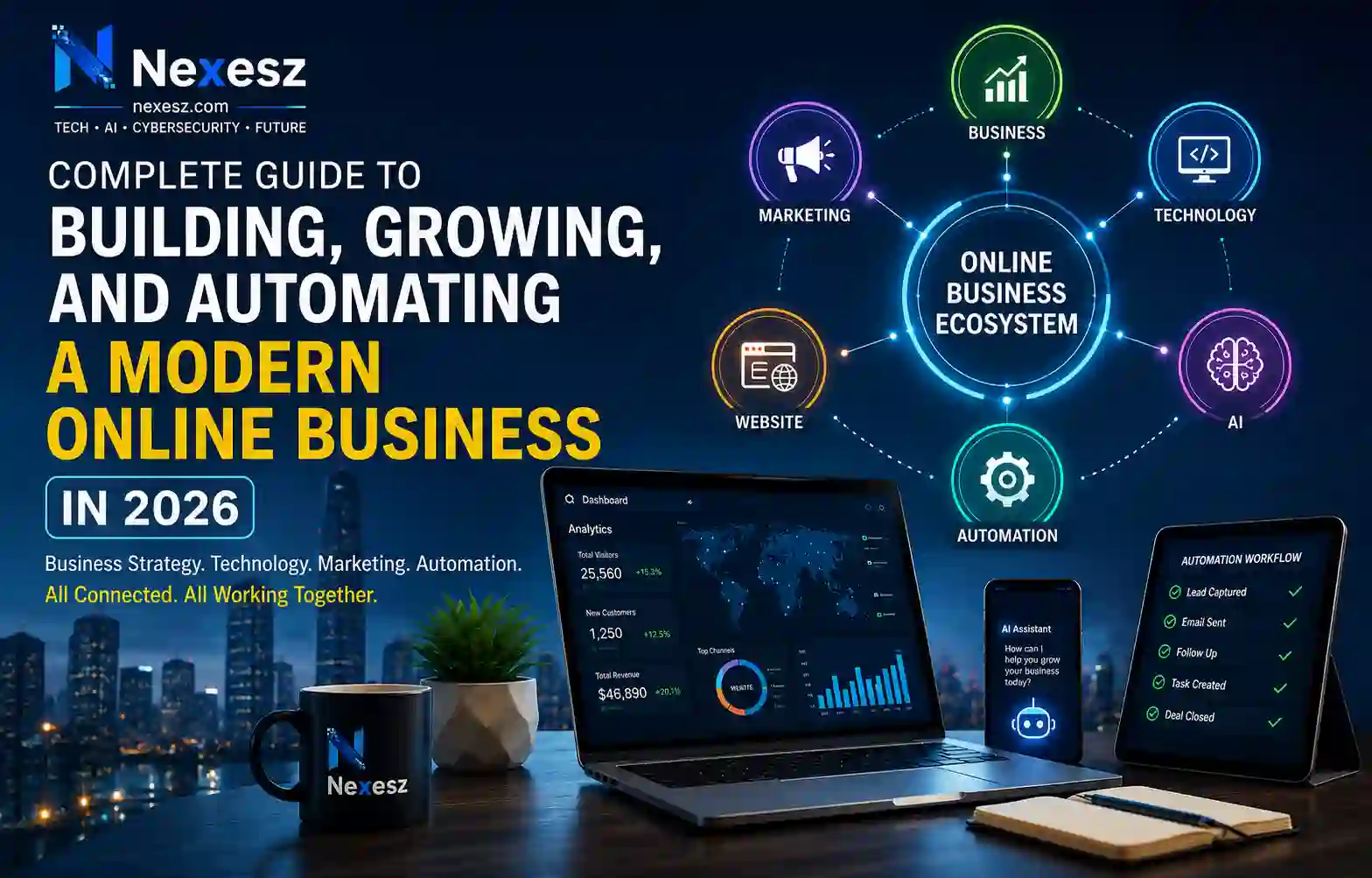
The internet has transformed the way businesses are created, promoted, and operated. What once required a physical location, local customers, and traditional advertising can now be built around a website, digital platforms, online services, and a global audience. The shift to modern online business has created new opportunities for entrepreneurs, small businesses, freelancers, and creators to reach customers and compete in an increasingly digital economy.
At the same time, technology, artificial intelligence, marketing, websites, and freelancing have become closely connected. A website provides the foundation for an online presence, SEO and digital marketing help people discover a business, AI can support research and content creation, automation can reduce repetitive work, and freelancing enables people to turn digital skills into services and income. These are no longer separate areas; they work together as parts of a modern online business ecosystem.
In this guide, you will learn how to connect these areas to build, launch, and grow an online business. From developing the right business strategy and technology foundation to attracting customers and using AI and automation effectively, this guide will show why sustainable online success requires business strategy + technology + marketing + automation working together.
Table of Contents
Toggle1. Understanding the Modern Online Business Ecosystem

The modern online business ecosystem is no longer built around a single website, platform, or digital tool. It is a connected environment where business strategy, technology, websites, marketing, artificial intelligence, automation, data, and digital skills support different parts of the same business. Understanding how these areas connect is important because success online rarely comes from using one tool in isolation. Instead, businesses need to combine the right resources to create value, reach customers, operate efficiently, and adapt as their market changes.
What Is an Online Business?
An online business is a business that uses the internet and digital technologies as an important part of how it creates, delivers, promotes, or sells products and services. It can include e-commerce stores, software companies, digital agencies, freelance services, online education, content websites, consulting businesses, and companies that provide digital products or services.
The internet allows these businesses to communicate with customers, present their offers, receive enquiries or orders, provide support, and manage different activities without depending entirely on a physical location. An e-commerce business can sell products through an online store, while a freelancer can provide design, development, writing, marketing, or other professional services to clients remotely. Digital platforms have also created new ways for businesses and independent professionals to connect across geographical boundaries. The International Labour Organization identifies digital labour platforms as an important part of the changing world of work and notes that they have created opportunities for enterprises, business development, and new sources of work and income.
However, an online business is more than having a website or social media account. A website may provide the foundation for an online presence, but the business still needs a clear purpose, target audience, valuable offer, customer acquisition strategy, and reliable operating processes. Technology should support these business objectives rather than become the objective itself.
This distinction is important because a business can have advanced technology and still fail if it does not solve a real customer problem. The strongest online businesses begin with a clear business need and then use digital resources to deliver that value more effectively.
How the Digital Business Landscape Has Changed
The digital business landscape has changed significantly as internet connectivity, smartphones, cloud computing, online platforms, digital payments, social media, and other technologies have become part of everyday commercial activity. Businesses can now communicate with customers through multiple digital channels, reach audiences outside their local markets, and deliver many products and services remotely.
This transformation has also changed the opportunities available to smaller businesses and individuals. Online platforms can help smaller firms overcome some of the limitations associated with size by providing access to markets, networks, and digital services. OECD research highlights that digitalisation can help SMEs access new markets and improve operational efficiency.
The way people work has changed as well. Freelancers and independent professionals can use digital platforms and online communication tools to provide services to businesses and customers in different locations. This has expanded the role of digital skills in areas such as web development, graphic design, content creation, software development, SEO, marketing, and virtual assistance. At the same time, the growth of platform work has introduced new challenges, meaning that digital opportunities need to be considered alongside questions about work conditions and protections.
Artificial intelligence is now adding another major layer to this transformation. Businesses are increasingly experimenting with AI for activities such as research, content-related work, analysis, customer interaction, and productivity. The OECD’s 2026 SME research reports that adoption of off-the-shelf AI tools is increasing, while also emphasizing that strategic, targeted, and secure integration into business operations remains uneven.
As a result, the modern digital business environment is not simply about moving traditional activities online. It is about redesigning how businesses create value, communicate with customers, use information, deliver services, and manage operations.
The Main Components of a Successful Online Business
A successful online business requires several connected components rather than one single technology. The first is business strategy. This establishes the target audience, customer problem, value proposition, business model, pricing approach, competitive position, and long-term goals. Without this foundation, businesses may spend time and money on tools or marketing activities that do not contribute to meaningful results.
The second component is technology and digital infrastructure. Depending on the business model, this can include a website, e-commerce platform, hosting, cloud services, payment systems, analytics, communication tools, customer relationship systems, and other software. Technology should be selected based on the business’s actual requirements.
The third component is marketing and customer acquisition. A useful product or service still needs to reach the people who may want it. SEO, content marketing, social media, email marketing, paid advertising, and other channels can help businesses build visibility and attract relevant audiences.
Another important component is customer experience. Visitors need clear information, easy navigation, trustworthy communication, and a straightforward process for taking action. Good customer experience helps connect marketing activity with actual business outcomes.
Finally, businesses need data, measurement, and continuous improvement. Analytics can reveal how people interact with a website, which marketing channels perform well, and where improvements may be needed. AI and automation can then support selected processes, helping businesses handle repetitive activities and use resources more efficiently.
These components work best when they are planned as parts of one system. Digitalisation can strengthen competitiveness and productivity, but OECD research also points out that businesses face barriers such as skills gaps, limited resources, maintenance costs, and cybersecurity challenges.
Business, Technology, Marketing, and Automation: How They Work Together
The relationship between business, technology, marketing, and automation becomes clearer when they are viewed as different stages of the same system. Business strategy provides the direction. Technology provides the infrastructure. Marketing creates visibility and demand. Automation improves the efficiency of repeatable processes.
For example, imagine a business that provides professional digital services. Its business strategy defines the customers it wants to serve and the services it will offer. Its website communicates that offer and provides a way for potential customers to make contact. SEO and content marketing help the right audience discover the business. Once someone submits an enquiry, automated workflows can organize notifications, follow-ups, or other routine steps. Analytics can then show which channels and activities are producing useful results.
AI can support several parts of this system, but it should be integrated with a specific business purpose in mind. It may assist with research, summarizing information, analysing patterns, preparing content drafts, or supporting customer-service workflows. Human judgement remains important for accuracy, quality, strategy, and decisions that directly affect customers.
This connected approach is what makes an online business ecosystem different from simply collecting digital tools. The objective is not to use the most technologies. The objective is to select technologies that solve genuine business problems and connect them into useful workflows.
When these areas are aligned, each part strengthens the others. A clear strategy makes technology choices more focused; appropriate technology improves the customer experience; marketing brings qualified visitors to the business; and automation can reduce repetitive work as operations grow. This creates a more efficient and adaptable foundation for long-term digital growth.
For businesses building their digital foundation, the next step is to understand the wider principles of business strategy and technology and how they influence online growth. These areas provide the foundation for the later use of marketing, AI, automation, and other digital tools.
2. Starting and Building a Successful Startup

A startup begins with an idea, but an idea alone is not enough to create a sustainable company. Successful startups identify a real problem, understand the people who experience it, test whether the market needs a solution, and build a business model that can support future growth. For an online startup, digital tools can make it easier to research customers, launch products, communicate with users, and operate with a smaller team.
The most effective approach is to avoid trying to build everything at once. Start with a clear problem, validate the opportunity, create a simple solution, gather feedback, and improve based on what real customers tell you. This reduces unnecessary costs and gives founders a clearer path toward sustainable growth.
What Is a Startup?
A startup is a new business created to develop and deliver a product or service while searching for a repeatable and scalable business model. Startups can operate in almost any industry, including software, ecommerce, education, financial technology, artificial intelligence, digital services, and online consulting.
The important difference is that a startup usually operates with a high level of uncertainty. Founders may still be testing their target market, pricing, product features, customer acquisition methods, and overall business model.
A startup does not necessarily need to be a technology company. However, technology can help modern startups reach customers faster, manage operations more efficiently, collect useful data, and expand into new markets.
How to Find a Profitable Business Idea
A strong startup idea usually begins with a real customer problem rather than a product that seems interesting. Look for situations where people regularly waste time, spend too much money, experience frustration, or struggle to find a suitable solution.
Start by examining your own skills, industry experience, customer conversations, online communities, competitor products, and market demand. Ask yourself what problem exists, who experiences it, how people currently solve it, and whether they would pay for a better solution.
Your skills can also reveal promising opportunities. For example, someone with design, writing, programming, teaching, consulting, or marketing skills can turn that expertise into a service or digital product. Nexesz already covers this process in its guide on turning your skills into a profitable online business, which explains how to identify useful skills, select a niche, create an offer, and build an online presence.
Market research should then confirm whether the idea has enough demand to justify further investment. Look at competitors, pricing, customer reviews, search behavior, and gaps in existing products. A good opportunity often appears where there is a clear customer need and an existing solution that could be made more useful, affordable, accessible, or convenient.
How to Validate a Startup Idea
Before investing heavily in development, validate your startup idea with real potential customers. Validation helps determine whether people actually have the problem and whether your proposed solution provides enough value.
You can start with customer interviews, surveys, competitor analysis, landing pages, prototypes, waitlists, pre-orders, or a simple manually delivered service. The purpose is not to make the product perfect. It is to learn whether the basic idea deserves further investment.
Strong validation comes from behavior rather than compliments. A potential customer saying an idea sounds good is useful, but stronger evidence includes signing up, requesting a demo, using a prototype, joining a waiting list, purchasing the product, or returning to use it again.
Testing early can prevent founders from spending months building features that customers never wanted.
Creating a Business Model
A business model canvas can help founders map customers, value, channels, and revenue before launch. After identifying a problem and validating demand, the next step is deciding how the startup will make money. A business model explains how the company creates value for customers, delivers that value, and generates revenue.
Common models include subscriptions, one-time purchases, commissions, transaction fees, advertising, licensing, consulting, and freemium services.
Your business model should clearly answer several questions:
Who is the target customer? What problem are you solving? What are you offering? Why should customers choose your solution? How will you reach them? What will they pay? What will it cost to deliver the product or service?
A startup should also consider whether the model can support future growth. Revenue should not only be possible; it should ideally become more predictable and efficient as the business expands.
Building a Minimum Viable Product (MVP)
A Minimum Viable Product (MVP) is an early version of a product that contains enough functionality to test its main value proposition with real users.
The goal is not to create a low-quality product. The goal is to focus development on the most important customer problem instead of spending resources on features that have not yet been proven necessary.
For example, a software startup could launch a simple web application with one core feature instead of building a complete platform. A service business might first deliver a service manually before developing software to automate the process.
Once users begin interacting with the MVP, founders can collect feedback, identify problems, measure usage, and decide which improvements should come next.
Common Startup Mistakes to Avoid
One of the biggest mistakes startups make is building too much before confirming that customers actually want the product. Another common problem is trying to serve everyone instead of focusing on a specific audience.
Startups may also struggle because of unclear pricing, poor financial planning, weak customer research, unrealistic growth expectations, or excessive spending on tools and technology.
Ignoring marketing is another problem. Even a strong product can remain invisible if potential customers cannot discover it. Startups need a clear plan for reaching their audience through channels that fit their market.
A related mistake is treating every new technology as essential. Tools should solve genuine business problems rather than increase complexity.
How Startups Can Use Technology and AI
Technology allows startups to operate more efficiently and reach customers without relying entirely on traditional infrastructure. Cloud services, analytics platforms, communication software, customer relationship tools, digital payment systems, and online marketing platforms can support important business activities.
AI can add another layer of productivity. Startups can use AI for research, customer-support assistance, content drafting, data analysis, software development, documentation, and repetitive workflow tasks.
However, AI works best when it is connected to a clear process. A startup should first identify where time, money, or productivity is being lost and then determine whether AI can improve that specific process.
Technology also becomes more valuable when it connects different parts of the business. For example, a website can generate leads, analytics can measure visitor behavior, a CRM can organize customer information, and automation can handle repetitive follow-ups.
Using Digital Marketing to Acquire Customers
A startup needs more than a product; it needs a reliable way to reach people who may want that product. Digital marketing can help startups build visibility through search engines, content, social media, email, and paid advertising.
A professional website gives customers a place to learn about the startup, understand its value proposition, and take action. SEO can help potential customers discover useful pages through search, while content marketing can demonstrate expertise and answer customer questions.
Nexesz’s guide on growing a small business using digital marketing covers practical strategies such as SEO, useful content, social media, email marketing, paid advertising, and performance tracking.
For an early-stage startup, the goal should not be to use every marketing channel at once. It is usually more effective to select the channels most relevant to the target audience, measure the results, and invest more heavily in the approaches that generate qualified traffic, leads, or sales.
How to Scale a Startup
Scaling means increasing customers, revenue, or market reach while maintaining healthy operations and financial control. Before scaling aggressively, a startup should understand which products customers want, which acquisition channels produce results, and which internal processes can be repeated efficiently.
Standardized processes become especially important as a company grows. Tasks that were manageable for one founder may become time-consuming when customer volume increases. At this stage, technology, automation, documentation, and specialized employees can help the business handle greater demand.
Financial management is equally important. Rapid growth can create cash-flow pressure when expenses increase faster than revenue. Startups should therefore monitor revenue, costs, customer acquisition, retention, and profitability as they expand.
A scalable startup is not simply one that grows quickly. It is one that can increase its output and customer base without creating unsustainable operational complexity.
Building a Strong Foundation for Long-Term Growth
The strongest startups treat growth as a process of continuous learning. They begin with a real problem, research the market, test assumptions, develop an MVP, listen to customers, and improve the product based on evidence.
As the business becomes more established, technology, digital marketing, AI, and automation can strengthen different parts of the operation. Marketing attracts the right audience, technology supports delivery, AI can improve productivity, and automation can reduce repetitive work.
The result is a connected business system rather than a collection of unrelated tools. Starting small, validating carefully, and improving consistently gives a startup a stronger foundation for sustainable growth.
3. Building a Strong Business Foundation
US-based founders can review our guide to choosing the right small business structure. Is article ka focus US legal structures par hai.

A strong business foundation gives an online business the structure it needs to survive, compete, and grow. Before focusing heavily on traffic, sales, or expansion, a business needs clarity about what it offers, who it serves, how it makes money, and what makes it different from competitors. The foundation also includes planning, branding, financial management, and performance measurement.
For a modern online business, these elements work together. A clear business model determines how value is created, and revenue is generated. Understanding the target audience helps shape products, pricing, messaging, and marketing. Competitive research shows where opportunities and challenges exist, while a strong value proposition explains why customers should choose one business over another. As the business develops, financial tracking and performance measurement help owners make decisions based on evidence rather than assumptions.
Choosing the Right Business Model
A business model explains how a company creates value for customers and generates revenue from that value. Choosing the right model is one of the first important decisions because it influences pricing, operations, marketing, customer acquisition, and future growth.
Online businesses can use several models, including ecommerce, subscriptions, digital products, advertising, affiliate marketing, consulting, freelancing services, software as a service, and online courses. Some businesses also combine multiple revenue streams. For beginners, understanding how to start an online business can help turn a simple idea or skill into a practical business model.
The right choice depends on the type of customer, the problem being solved, the resources available, and how the product or service is delivered. A simple service-based model may be easier for a beginner to launch, while a subscription or SaaS model may provide recurring revenue but require more development and ongoing support.
A useful business model should answer three basic questions: what value are you providing, who is willing to pay for it, and how can you deliver it efficiently?
Identifying Your Target Audience
Trying to sell to everyone can make marketing and product development much harder. A clearly defined target audience helps a business understand exactly who it is trying to serve.
Start by identifying characteristics such as customer needs, interests, professional situation, purchasing behavior, location, and problems they are trying to solve. For business-to-business companies, consider factors such as company size, industry, job role, budget, and decision-making process.
Understanding the audience goes deeper than basic demographics. You need to know what customers care about, what prevents them from purchasing, what alternatives they currently use, and what results they expect.
Customer interviews, surveys, search research, reviews, community discussions, and competitor analysis can all provide useful insights. The more accurately a business understands its customers, the easier it becomes to create relevant offers and communicate their benefits.
Understanding Your Competition
Competition research helps a business understand the market it is entering. Competitors are not necessarily a threat; they can also show you what customers already value and where gaps may exist.
Analyze competing businesses by looking at their products or services, pricing, positioning, customer reviews, websites, content, marketing channels, and overall customer experience. Pay particular attention to complaints in customer reviews because they may reveal opportunities to provide something better.
The goal is not to copy another business. Instead, identify areas where your company can create a meaningful difference. This might involve better customer service, clearer communication, a simpler product, a more specialized niche, faster delivery, stronger expertise, or a more convenient experience.
Creating a Unique Value Proposition
A unique value proposition (UVP) explains why a customer should choose your business instead of another available option. It should communicate the specific value you provide rather than simply listing features.
A strong value proposition connects three things: the customer’s problem, your solution, and the outcome you provide.
For example, saying that a company offers “digital marketing services” is relatively broad. A more specific message could explain that the company helps small businesses attract qualified customers through SEO and content marketing.
The best value propositions are clear enough that visitors can quickly understand what the business does, who it helps, and why it is useful. This message should remain consistent across the website, landing pages, social profiles, advertisements, and other customer touchpoints.
Developing a Business Strategy
A business strategy turns the company’s goals into a practical direction. It helps determine where the business should compete, how it will create value, which customers it will prioritize, and what actions should receive resources.
A useful strategy should include measurable goals, a clear target market, a defined value proposition, revenue objectives, marketing priorities, operational requirements, and a plan for handling important risks.
Strategy should not be treated as a document that is written once and forgotten. Markets change, competitors introduce new products, customer behavior evolves, and technology creates new opportunities. Starting an online business also requires clear planning around the audience, offer, goals, and resources before investing heavily in growth.
Good strategy also requires prioritization. Businesses have limited time, money, and people, so trying to pursue every opportunity at once can weaken execution.
Building a Brand
A brand is more than a logo or color scheme. It represents how people recognize, understand, and experience a business.
A strong brand usually combines a consistent visual identity with a clear voice, useful customer experience, and recognizable positioning. Elements such as the logo, typography, colors, messaging, website design, content style, and customer interactions should create a consistent impression.
Trust is particularly important online because potential customers may have no physical interaction with the business before making a purchase. Professional presentation, transparent information, useful content, reviews, clear policies, and reliable communication can all contribute to credibility.
A business should also make sure its brand promises match the actual customer experience. Strong branding cannot compensate for poor products, confusing processes, or unreliable service.
Managing Business Finances
Financial management is essential for both new and established businesses. Revenue alone does not determine whether a company is healthy. Business owners also need to understand expenses, cash flow, profit margins, pricing, and the financial resources required to maintain operations.
Start by separating business and personal finances where practical, tracking income and expenses, and creating a realistic operating budget. Monitor recurring costs such as software subscriptions, hosting, advertising, salaries, transaction fees, and professional services.
Pricing should reflect the value delivered while also accounting for the costs involved in providing the product or service. Underpricing can create growth problems when a business gains customers but does not generate enough margin to support delivery.
Cash flow deserves particular attention. A profitable business can still experience financial pressure when money comes in later than expenses need to be paid. Regular financial reviews help identify problems early and support better decisions about spending and investment.
Measuring Business Performance
Once a business is operating, performance measurement shows whether the strategy is actually producing results. Without measurement, it is difficult to know which activities are working and which need improvement.
Useful key performance indicators (KPIs) depend on the type of business. An ecommerce company may monitor conversion rate, average order value, customer acquisition cost, revenue, and repeat purchases. A service business may track leads, proposals, client acquisition, retention, project profitability, and revenue per client. A content-based website may focus on organic traffic, engagement, conversions, and revenue generated from different channels.
The important principle is to measure metrics that connect directly to business goals. A large amount of website traffic, for example, is not necessarily valuable if visitors never become leads or customers.
Regular analysis creates a feedback loop: set goals, measure performance, identify gaps, make improvements, and measure again.
4. Digital Marketing: How to Attract Customers Online
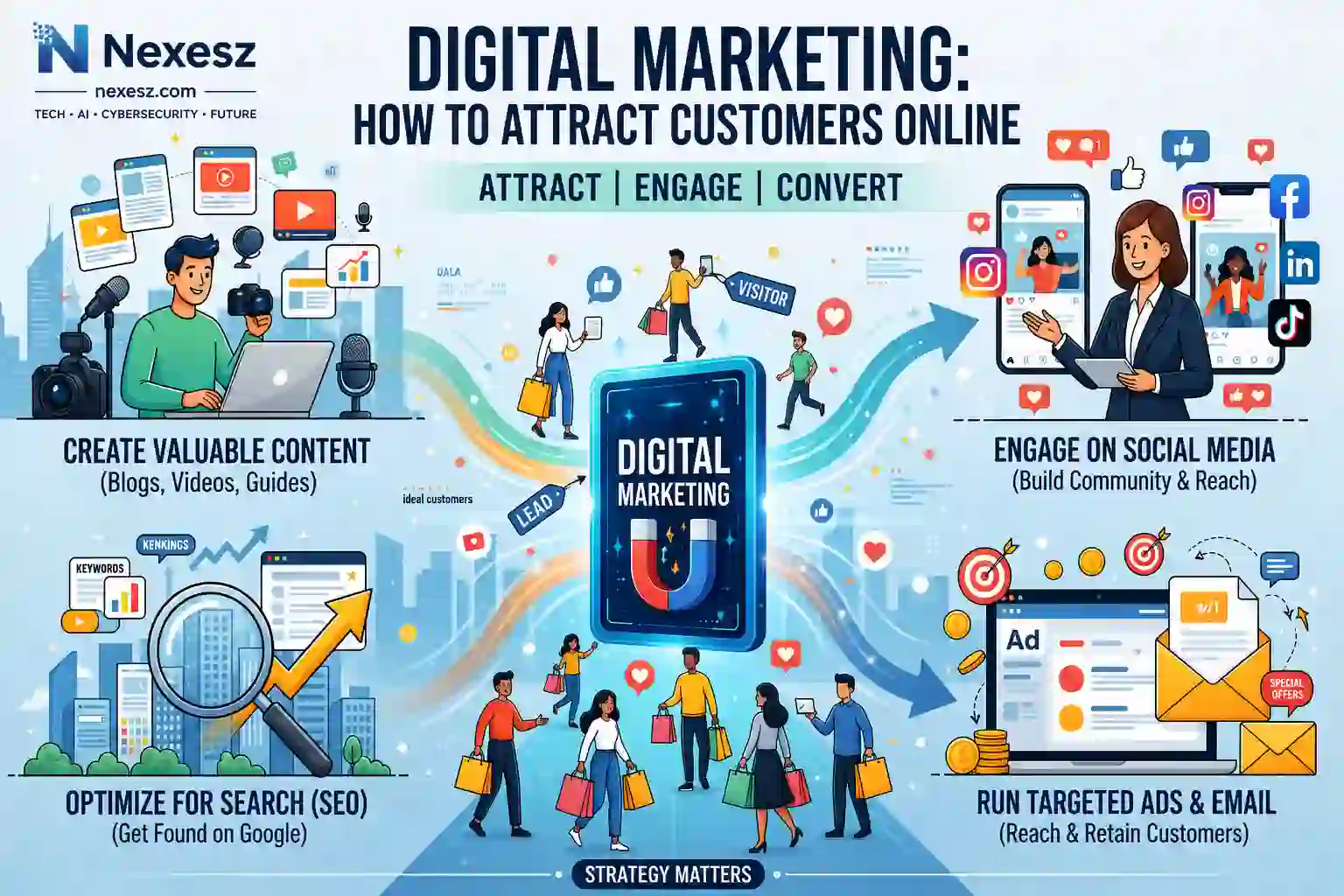
Digital marketing has become one of the most important ways for modern businesses to attract customers, build brand awareness, and generate sales. Instead of depending only on traditional advertising, businesses can use search engines, websites, social media, email, content, and paid advertising to reach people at different stages of the buying journey.
For small businesses and startups, digital marketing can also provide a practical way to compete with larger companies. A well-planned strategy can help a business reach a targeted audience, measure results, and improve campaigns over time.
What Is Digital Marketing?
Digital marketing is the use of online channels and digital technologies to promote products, services, brands, or businesses. It includes activities such as search engine optimization (SEO), content marketing, social media marketing, email marketing, paid advertising, and local SEO.
Unlike many traditional marketing methods, digital marketing allows businesses to track how people interact with their campaigns. Businesses can measure website visits, clicks, leads, conversions, and other performance indicators to understand what is working.
Why Is Digital Marketing Important for Online Businesses?
A strong online presence is essential when customers use search engines, social platforms, and websites to research products and services. Digital marketing helps businesses become visible where potential customers are already spending their time.
It can help businesses:
- Reach a larger and more targeted audience
- Increase website traffic
- Build brand awareness
- Generate leads
- Improve customer engagement
- Promote products and services
- Measure marketing performance
- Build long-term customer relationships
For small businesses, combining several digital channels can create a more sustainable customer acquisition system. Businesses looking for a practical starting point can also learn from this guide on growing a small business using digital marketing.
Search Engine Optimization (SEO)
SEO helps websites appear more prominently in search engine results when people search for relevant information, products, or services. It is one of the most valuable long-term digital marketing strategies because businesses can continue attracting organic traffic without paying for every individual visit.
An effective SEO strategy can include:
- Keyword research
- Helpful and relevant content
- On-page optimization
- Internal linking
- Technical SEO
- Image optimization
- Mobile-friendly design
- Fast page performance
- High-quality backlinks
The goal should not simply be to add keywords to a page. Businesses should create useful content that genuinely answers the questions and needs of their target audience.
Content Marketing
Content marketing focuses on creating and distributing useful information to attract and educate a specific audience. Instead of constantly promoting products, businesses can publish content that helps potential customers solve problems or make better decisions.
Common forms of content include:
- Blog posts
- How-to guides
- Tutorials
- Product comparisons
- Case studies
- Videos
- Infographics
- FAQs
High-quality content can support SEO, build authority, answer customer questions, and guide visitors toward products or services.
Social Media Marketing
Social media marketing allows businesses to communicate directly with their audiences through platforms such as Facebook, Instagram, LinkedIn, TikTok, and Pinterest.
Businesses can use social media to share educational content, product demonstrations, customer experiences, company updates, and promotional offers.
However, businesses do not necessarily need to be active on every platform. It is usually better to focus on the platforms where the target audience is most active and consistently publish useful content.
Email Marketing
Email marketing provides a direct communication channel between a business and its audience. Unlike social media, where businesses depend heavily on platform algorithms, an email list gives businesses a more direct way to communicate with subscribers.
Email campaigns can be used to:
- Share educational content
- Announce new products
- Send promotions
- Follow up with leads
- Provide business updates
- Encourage repeat purchases
Successful email marketing should provide value rather than sending promotional messages constantly. Useful newsletters, personalized recommendations, and relevant updates can help build stronger relationships with customers.
Paid Advertising
Paid advertising can help businesses reach potential customers faster than many organic strategies. Common options include Google Ads, Facebook Ads, Instagram Ads, LinkedIn Ads, and YouTube advertising.
Paid campaigns can be useful when a business wants to promote a specific product, service, landing page, or special offer.
However, advertising should be approached strategically. Businesses should define their audience, establish a realistic budget, test different campaigns, and measure conversions before increasing spending.
Local SEO for Businesses
Local SEO is particularly important for businesses that serve customers in specific cities or geographic areas. It helps businesses become more visible when people search for nearby products or services.
Important local SEO activities include maintaining accurate business information, optimizing a Google Business Profile, collecting genuine customer reviews, using relevant local keywords, and keeping contact information consistent across online platforms.
For a local business, strong local visibility can turn online searches into phone calls, website visits, bookings, and physical visits.
Building an Integrated Digital Marketing Strategy
Digital marketing channels work best when they support each other rather than operating as completely separate activities.
For example, a business can publish a useful blog post, optimize it for search engines, share it on social media, promote it through email, and use paid advertising to reach a larger audience. Each channel can contribute to the same overall marketing goal.
A simple integrated strategy can follow this process:
- Define the target audience.
- Identify customer problems and needs.
- Create useful content.
- Optimize content for search.
- Promote content through relevant social platforms.
- Build an email audience.
- Use paid advertising when appropriate.
- Measure performance.
- Improve the strategy based on data.
This approach creates a connected marketing system instead of relying on one traffic source.
Measuring Digital Marketing Performance
Marketing decisions should be based on data rather than assumptions. Businesses should regularly monitor whether their marketing activities are generating meaningful results.
Important metrics can include:
- Website traffic
- Organic search traffic
- Click-through rates
- Engagement
- Leads
- Conversion rates
- Customer acquisition cost
- Email open and click rates
- Advertising return on investment
Tools such as Google Analytics and Google Search Console can help businesses understand website traffic and search performance.
The most important metric depends on the business goal. A lead-generation website may focus on qualified leads and conversions, while an ecommerce business may focus more heavily on sales and revenue.
Creating a Sustainable Digital Marketing System
Digital marketing should be treated as an ongoing process rather than a one-time campaign. Search trends change, customer behavior evolves, competitors introduce new strategies, and digital platforms regularly update their features.
A sustainable system combines SEO, content, social media, email, paid advertising, analytics, and continuous improvement according to the business’s specific goals.
The key is to start with a manageable number of channels, understand what produces results, and gradually expand. When digital marketing is connected with a strong business strategy and the right technology, it becomes more than a promotional activity—it becomes an important part of the overall online business system.
5. Affiliate Marketing: Building an Online Income Stream

Affiliate marketing is one of the most accessible ways to build an online income stream without creating your own products or managing physical inventory. Instead, you recommend relevant products or services from other companies and earn a commission when someone completes a qualifying action through your referral.
For modern online businesses, affiliate marketing can become more than an additional source of income. It can work alongside SEO, content marketing, social media, email marketing, and website development. The strongest affiliate businesses focus on helping people make informed decisions rather than simply placing promotional links throughout their content.
What Is Affiliate Marketing?
Affiliate marketing is a performance-based business model where an individual or company promotes another business’s products or services in exchange for a commission on qualifying referrals.
The process usually involves three main parties:
- Merchant: The company selling the product or service.
- Affiliate: The person or business promoting the offer.
- Customer: The person who clicks the affiliate link and completes a qualifying action.
For example, a technology website might publish an article comparing several SEO tools. If a reader clicks an affiliate link and purchases one of the recommended tools, the website may receive a commission according to the affiliate program’s terms.
The important point is that affiliate marketing should be based on relevance and trust. Recommending products that genuinely help your audience is more sustainable than promoting products simply because they offer high commissions.
How Affiliate Marketing Works
The basic affiliate marketing process is straightforward.
First, you choose a niche and identify products or services that are useful to your target audience. You then apply to relevant affiliate programs. If approved, you receive unique tracking links that allow the merchant to identify customers referred by you.
The typical process looks like this:
- Choose a specific niche.
- Research your target audience.
- Find relevant affiliate programs.
- Join suitable programs.
- Create useful content.
- Add relevant affiliate links.
- Attract targeted visitors.
- Earn commissions from qualifying actions.
Affiliate programs can use cookies and other tracking technologies to connect referrals with affiliates. Each program has its own rules, commission structure, attribution period, payment requirements, and promotional restrictions.
This means you should always understand the terms of an affiliate program before promoting its products.
Choosing a Profitable Affiliate Niche
Your niche is the specific area or market around which you build your affiliate content. Choosing the right niche can make content creation easier and help you attract a more relevant audience.
A strong affiliate niche should have:
- A clearly defined audience
- Existing demand
- Enough content opportunities
- Relevant products or services
- Reasonable competition
- Long-term potential
- Suitable affiliate programs
Do not select a niche only because someone claims it is highly profitable. A niche with high commissions may still be difficult if the products are expensive, the audience is small, or the competition is extremely strong.
For example, instead of targeting the broad topic of “technology,” you could focus on software for small businesses, website-building tools, SEO tools, AI productivity tools, or cybersecurity solutions.
A focused niche also makes it easier to develop topical authority because your website can consistently cover related questions, problems, products, and solutions.
Finding Affiliate Programs
After selecting your niche, the next step is finding affiliate programs that match your audience.
You can discover programs through:
- Individual company websites
- Affiliate networks
- Software companies
- Ecommerce businesses
- Online education platforms
- Digital service providers
Do not compare affiliate programs based only on commission percentages. Product quality, audience relevance, conversion potential, payment terms, and program policies are equally important.
Before joining a program, check:
- Commission rate
- Commission type
- Cookie or attribution period
- Payment schedule
- Minimum payout
- Refund policy
- Promotional restrictions
- Accepted traffic sources
For example, Nexesz’s guide to high-paying affiliate programs for beginners compares programs such as HubSpot, Semrush, GetResponse, Fiverr, and Elementor while explaining factors such as commission rates, cookie duration, product quality, and payment terms.
Creating Affiliate Content
Content is the foundation of a successful affiliate marketing strategy. Instead of creating articles that exist only to place affiliate links, focus on answering questions and helping readers solve problems.
Useful affiliate content includes:
- Product reviews
- Product comparisons
- Buying guides
- Tutorials
- How-to articles
- Software comparisons
- Product lists
- Case studies
For example, instead of writing a simple article called “Best SEO Tools,” create a detailed comparison that explains which tools are suitable for beginners, small businesses, agencies, or advanced users.
High-quality affiliate content should explain important features, benefits, limitations, pricing considerations, and who the product is suitable for.
This approach gives readers useful information before they make a purchasing decision.
SEO for Affiliate Websites
Search engine optimization can help affiliate websites attract targeted organic traffic. Instead of paying for every visitor, a well-optimized page can potentially continue attracting search traffic over time.
Important affiliate SEO activities include:
- Keyword research
- Search intent analysis
- Helpful content
- On-page SEO
- Internal linking
- Technical SEO
- Mobile optimization
- Image optimization
- Website performance
- Relevant backlinks
Search intent is particularly important. Someone searching for “what is SEO” is probably looking for educational information, while someone searching for “best SEO software for small business” may be comparing products.
Your content should match the user’s intent instead of forcing an affiliate recommendation into every article.
Internal linking is also valuable because it helps readers discover related content. For example, an informational article can link to a detailed comparison, while a comparison can link to a product review or buying guide.
Affiliate Marketing With Social Media
Social media provides another way for affiliate marketers to reach potential customers. Depending on the niche, platforms such as YouTube, Instagram, Facebook, TikTok, Pinterest, and LinkedIn can help build an audience.
The most effective approach is usually to provide value before promoting an offer.
For example, a technology creator could publish:
- Software tutorials
- Product demonstrations
- Tool comparisons
- Educational videos
- Productivity tips
- Website tutorials
A social media post can attract attention, while a longer article or video can provide the detailed information needed before someone decides to purchase.
However, affiliates should follow the rules of both the social platform and the affiliate program. Commercial relationships should also be disclosed where required.
Using AI for Affiliate Marketing
Artificial intelligence can help affiliate marketers save time and organize repetitive tasks. However, AI should support human expertise rather than replace research, judgment, and editorial review.
AI can assist with:
- Content ideas
- Topic research
- Article outlines
- Keyword organization
- Product comparison frameworks
- Content editing
- Social media ideas
- Data analysis
- Email drafts
For example, AI can help identify questions people may have about a particular product category. The marketer can then research those questions and create original content based on reliable information and practical insights.
This is especially important because product prices, features, commission rates, and affiliate program policies can change. Important information should always be reviewed before publication.
The goal is to use AI to improve productivity while maintaining accurate, useful, and trustworthy content.
Common Affiliate Marketing Mistakes
Many beginners make the mistake of treating affiliate marketing as a quick-money strategy. This often results in poor-quality content, excessive links, and unrealistic expectations.
Common mistakes include:
- Choosing a niche only for high commissions
- Promoting unrelated products
- Publishing thin content
- Adding too many affiliate links
- Ignoring search intent
- Making exaggerated income claims
- Failing to disclose affiliate relationships
- Ignoring affiliate program rules
- Not tracking results
- Expecting immediate income
Another major mistake is focusing only on traffic volume.
A website may receive thousands of visitors but generate very few commissions if those visitors are not interested in the recommended products. Targeted traffic is generally more valuable because visitors are more likely to have a genuine need for the product.
Trust should therefore remain at the center of affiliate marketing.
How to Build a Long-Term Affiliate Business
Building a long-term affiliate business requires treating affiliate marketing as a real online business rather than a collection of links.
Start with one focused niche. Build useful content around the questions and problems of your target audience. Then connect that content to relevant products and services where they genuinely provide a solution.
A strong content journey can look like this:
Informational content → Comparison content → Review content → Product recommendation → Conversion
For example, a reader might first discover your website through an educational article. After learning about the problem, they may read a comparison article, review different options, and eventually click an affiliate link.
You should also monitor performance. Track which pages receive organic traffic, which affiliate links receive clicks, and which products generate conversions.
Use this information to improve existing content rather than simply publishing more articles.
Your affiliate website can also become part of a larger online business system. A website can attract organic traffic through SEO, social media can increase reach, email can support relationships, and useful content can guide visitors toward relevant products.
For beginners who want to build this foundation, the Nexesz guide on building a successful affiliate marketing website covers niche selection, website setup, useful content, affiliate links, SEO, and traffic growth.
Diversification is another important part of long-term growth. Depending entirely on one affiliate program, one search engine, or one traffic source can create unnecessary risk.
Instead, build multiple relevant content assets and work with suitable programs that fit your audience.
6. Technology Every Modern Business Should Understand
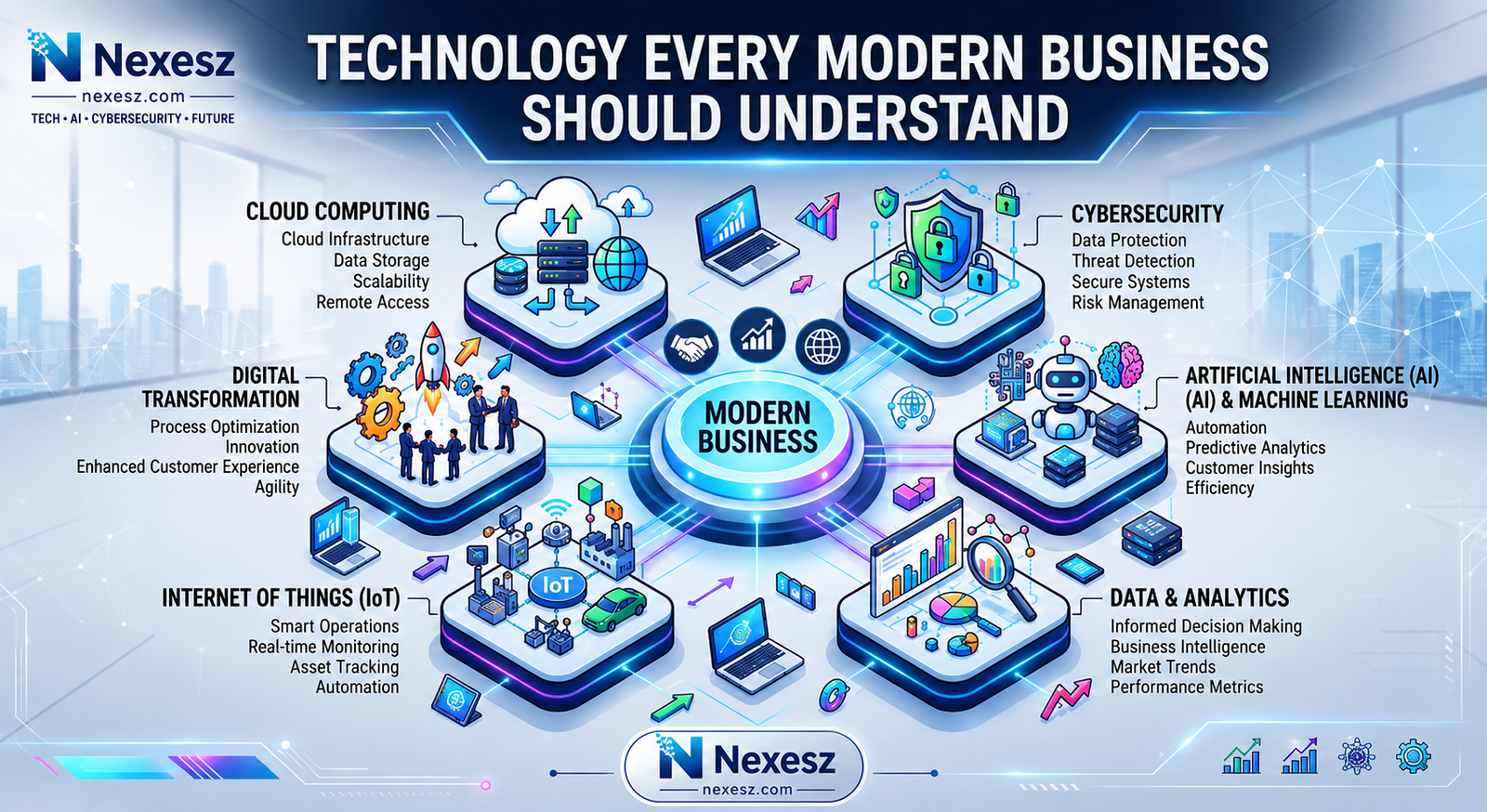
Technology has become a fundamental part of running a modern business. Whether a company operates entirely online, serves customers from a physical location, or combines both approaches, digital technology influences how it communicates, stores information, manages operations, attracts customers, and makes decisions.
A business does not need to use every new technology available. The goal is to understand which technologies solve real problems and create measurable value. Cloud computing can provide flexible infrastructure, cybersecurity can protect digital assets, analytics can support better decisions, artificial intelligence can improve productivity, and automation can reduce repetitive work.
For entrepreneurs and small businesses, understanding these technologies is particularly important because the right digital tools can provide capabilities that were once available mainly to larger organizations. At the same time, businesses must consider costs, security, privacy, integration, and long-term scalability when choosing technology.
Why Technology Matters for Modern Businesses
Technology gives businesses the infrastructure they need to operate efficiently in a digital economy. A website can provide an online presence, cloud platforms can support business applications, analytics can reveal customer behavior, and communication software can connect teams with customers regardless of location.
Technology can also improve productivity. Instead of manually performing the same task hundreds of times, businesses can use software and automation to handle repetitive processes. This allows employees and business owners to spend more time on activities that require creativity, judgment, and human interaction.
Another important advantage is scalability. A well-designed digital system can often support business growth without requiring every process to be rebuilt from scratch.
However, technology should support a business strategy rather than replace one. Before purchasing a tool or adopting a new system, businesses should identify the problem they are trying to solve, evaluate available options, and determine whether the expected benefits justify the cost and complexity.
Cloud Computing
Cloud computing allows businesses to access computing resources over the internet instead of relying entirely on physical servers and local infrastructure. These resources can include storage, databases, computing power, applications, and website hosting.
For a modern business, cloud services can make information and applications accessible from different locations and devices. This is particularly useful for remote and distributed teams that need to collaborate without being physically present in the same office.
Businesses can use cloud computing for:
- Website and application hosting
- Cloud storage
- Data backup
- Business software
- Database management
- Team collaboration
- Remote work
- Data processing
Cloud computing can also make it easier for growing businesses to increase their digital capacity when demand changes. Instead of purchasing expensive hardware in advance, businesses can often use cloud resources according to their requirements.
The key is to select cloud services that provide the right balance of performance, security, reliability, and cost.
Cybersecurity
As businesses move more operations online, cybersecurity becomes essential. A business may hold customer information, payment details, employee records, passwords, business documents, and other valuable data. Weak security can expose these assets to unauthorized access, malware, phishing, ransomware, and other attacks.
Cybersecurity is not only a concern for large corporations. Small businesses can also face significant risks because attackers may target poorly protected websites, outdated software, weak passwords, or compromised accounts.
Basic security practices include using strong and unique passwords, enabling multi-factor authentication, keeping software updated, creating reliable backups, controlling access to sensitive information, and training employees to recognize suspicious messages.
For website owners, protecting the website itself is especially important. You can learn more through our guide on how to protect your website from cyberattacks, which focuses on practical ways to strengthen website security.
Good cybersecurity should be treated as an ongoing business process rather than a one-time installation of a security tool.
Data and Analytics
Data helps businesses understand what is happening across their operations. Without reliable information, business decisions can easily become based on assumptions rather than evidence.
Analytics can help answer important questions such as:
- Where do customers come from?
- Which products or services generate the most revenue?
- Which marketing channels perform best?
- Which pages receive the most traffic?
- Where do customers leave the buying process?
- Which areas of the business need improvement?
For example, an online business can analyze website traffic, conversions, customer behavior, and sales performance to identify opportunities for growth.
Business intelligence tools can make this information easier to understand by transforming data into dashboards, reports, and visualizations. This allows business owners and teams to identify patterns and make more informed decisions.
Our guide to Best BI Tools for Startups is useful for businesses that want to explore how business intelligence software can support data-driven decision-making.
The goal of analytics is not to collect as much data as possible. It is to identify useful information and turn it into better business decisions.
Artificial Intelligence
Artificial intelligence is becoming an increasingly important business technology. AI systems can analyze information, generate text, summarize documents, assist with research, recognize patterns, support customer service, and perform many other tasks.
Businesses can use AI for activities such as:
- Content ideation
- Research assistance
- Customer support
- Data analysis
- Document processing
- Marketing assistance
- Personalization
- Product recommendations
- Software development
AI can be especially valuable when combined with human expertise. For example, a marketer can use AI to generate initial content ideas, but human judgment can still be responsible for strategy, fact-checking, editing, and final decisions.
Businesses should also consider accuracy, privacy, security, and human oversight when implementing AI. AI should solve a genuine business problem rather than being adopted simply because it is a popular technology.
For digital marketers who want practical examples of AI-powered tools, Nexesz also covers free AI tools for digital marketers that can help reduce repetitive work and improve productivity.
Automation
Automation allows businesses to perform predefined tasks with limited manual intervention. It can be as simple as automatically sending an email after a form submission or as advanced as connecting multiple business systems into one workflow.
Common automation examples include:
- Sending customer notifications
- Creating tasks automatically
- Moving information between applications
- Scheduling reports
- Updating databases
- Organizing leads
- Managing repetitive administrative tasks
AI is also making automation more capable. Traditional automation usually follows fixed rules, while AI-powered workflows can handle text, documents, and other less structured information.
The best starting point is usually a repetitive task that consumes significant time but follows a reasonably predictable process. Automating such tasks can improve consistency and allow employees to focus on more valuable work.
However, businesses should first understand and improve the process itself. Automating a poorly designed workflow can simply make a bad process operate faster.
Business Software and SaaS
Business software helps organizations manage everyday activities such as accounting, customer relationships, communication, marketing, projects, and operations.
Software as a Service, commonly known as SaaS, allows businesses to access software through the internet rather than installing and maintaining every application locally.
Businesses can use SaaS platforms for:
- Customer relationship management
- Accounting
- Project management
- Email marketing
- Team communication
- Customer support
- Human resources
- Marketing
- Document management
- Analytics
SaaS can be particularly useful for small businesses because it can provide access to sophisticated software without requiring a large internal IT department.
However, businesses should avoid collecting too many disconnected tools. Before adopting new software, consider its pricing, features, integrations, security, scalability, and data policies.
A well-planned technology stack should make business operations simpler and more connected, not more complicated.
Emerging Technologies
Technology continues to evolve, creating new opportunities for businesses. Artificial intelligence, AI agents, Internet of Things (IoT), edge computing, advanced analytics, robotics, and other emerging technologies may change how businesses operate in the coming years.
IoT, for example, connects physical devices to digital systems, enabling them to collect and exchange information. AI agents may increasingly handle multi-step tasks, while advanced analytics can help organizations discover patterns in large datasets.
Businesses should not automatically adopt every emerging technology. Instead, they should evaluate whether a technology can solve a genuine problem, improve customer experience, reduce costs, increase productivity, or create a new source of value.
A practical approach is to start small. Test a technology, measure the results, identify risks, and expand its use only when there is clear evidence that it benefits the business.
7. AI Automation: The Future of Business Productivity

Artificial intelligence and automation are changing how businesses complete tasks, manage information, communicate with customers, and improve productivity. Traditional automation has already helped businesses reduce repetitive manual work, but AI is expanding what automated systems can handle by allowing them to work with language, documents, data, and more complex decisions.
This makes AI automation particularly important for modern online businesses. A company can use AI to assist with research, content creation, customer support, marketing, sales, data analysis, and internal operations. When these capabilities are connected through automated workflows, businesses can create systems that perform multiple steps with less manual intervention.
AI automation does not mean removing humans from every process. The most useful approach is often to combine AI capabilities with human judgment. People can define goals, review important outputs, make strategic decisions, and handle situations that require context or accountability, while automated systems take care of repetitive and time-consuming work.
What Is AI Automation?
AI automation is the use of artificial intelligence together with automated workflows to complete tasks that would otherwise require manual human effort.
Traditional automation generally follows predefined rules. For example, a system might automatically send an email whenever someone submits a contact form. AI automation can go further by analyzing the information in that form, categorizing the request, generating a suitable response, and directing the information to the appropriate workflow.
AI automation can be used for tasks such as:
- Research and information processing
- Customer support
- Content creation
- Email management
- Lead qualification
- Data analysis
- Document processing
- Marketing workflows
- Sales assistance
- Internal business operations
The important distinction is that AI gives automated workflows greater flexibility when working with information that is not completely structured.
For an online business, this can turn automation from a simple time-saving feature into an important part of its operating system.
AI vs Traditional Automation
Traditional automation and AI automation are related, but they are not the same.
Traditional automation normally follows clearly defined rules. If a specific event occurs, the system performs a predetermined action. This makes traditional automation reliable for repetitive and predictable processes.
AI automation can handle more flexible tasks. Instead of only following fixed instructions, an AI system can interpret text, summarize information, classify requests, generate content, or identify patterns.
For example, a traditional workflow might send the same confirmation email to every new customer. An AI-powered workflow could analyze the customer’s message and help generate a response that is more relevant to their specific request.
Neither approach is automatically better. Traditional automation is often ideal for simple, predictable tasks, while AI automation becomes more useful when the workflow involves information that requires interpretation.
A strong business automation strategy can use both traditional automation and AI where each is most appropriate.
How AI Automation Works
AI automation usually combines several components rather than relying on a single AI model.
A typical workflow may include:
- Trigger — An event starts the workflow.
- Data collection — Relevant information is retrieved.
- AI processing — An AI model analyzes or generates information.
- Decision or classification — The system determines what should happen next.
- Action — Another application or service performs the required task.
- Human review — Important or sensitive outputs may be checked by a person.
- Record keeping — The workflow stores relevant information for future use.
For example, imagine a business receiving customer inquiries through its website. An automated workflow could capture the inquiry, use AI to identify the topic, classify the customer’s intent, save the information in a CRM, notify the appropriate team member, and prepare a draft response.
The exact workflow depends on the business and the tools being used. The most effective systems begin with a clear business process rather than starting with technology.
AI Agents and Agentic AI
AI agents represent a more advanced approach to automation. Instead of simply generating an answer to a single prompt, an AI agent can be designed to work toward a goal by performing multiple steps.
An agent may receive a task, gather information, use available tools, evaluate the results, and continue working through a sequence of actions.
For example, a business research workflow could ask an AI agent to gather information from approved sources, organize the findings, summarize them, and prepare a report for human review.
However, businesses should be careful about giving AI systems too much independence. Important workflows may involve sensitive information, financial decisions, customer communications, or business-critical actions.
Human oversight, clear permissions, testing, and appropriate safeguards are therefore important when implementing agentic systems.
The goal should be to create controlled autonomy, where AI can perform useful tasks while the business maintains appropriate control.
Automating Repetitive Business Tasks
One of the easiest places to begin with AI automation is repetitive work.
Many businesses spend hours performing tasks such as copying information between applications, organizing documents, answering similar questions, preparing reports, scheduling activities, or processing basic requests.
These tasks may not require constant human attention, making them suitable candidates for automation.
For example, a business could create a workflow that:
- Collects new leads
- Organizes their information
- Categorizes their needs
- Adds them to a CRM
- Sends a relevant follow-up
- Creates a task for the sales team
Another workflow might collect customer feedback, use AI to categorize common issues, and produce a summary for the business owner.
Before automating a task, however, identify how often it occurs, how much time it consumes, what information it requires, and what could go wrong. Automation works best when the underlying process is already clear.
AI Automation for Marketing
Marketing contains many repetitive activities that can benefit from AI assistance and automation.
Businesses can use AI automation to support:
- Content research
- Keyword organization
- Content briefs
- Email campaigns
- Social media planning
- Customer segmentation
- Campaign reporting
- Lead nurturing
- Performance analysis
For example, a marketing workflow could collect campaign data, summarize performance, identify unusual changes, and prepare a report for the marketing team.
AI can also assist with generating initial content ideas or variations, but human review remains important for accuracy, brand voice, originality, and strategic decisions.
This is especially useful for small businesses with limited marketing resources. Instead of manually handling every repetitive task, a small team can use automation to create more efficient processes.
Nexesz also covers free AI tools for digital marketers that can help marketers reduce repetitive work and save time across research, content, and marketing activities.
AI Automation for Customer Support
Customer support is another area where AI automation can provide significant value.
Businesses often receive similar questions about products, pricing, orders, services, account access, and basic troubleshooting. AI can help categorize these requests, retrieve relevant information, and prepare or provide suitable responses.
A customer support workflow might:
- Receive a customer message.
- Identify the subject of the request.
- Determine its priority.
- Search approved information.
- Generate a response.
- Escalate complex issues to a human agent.
- Record the interaction.
This can reduce the amount of repetitive work handled manually while allowing support teams to focus on more complicated customer problems.
However, businesses should avoid allowing AI to confidently provide incorrect information. Customer-facing automation should use reliable information sources, clear boundaries, and human escalation when necessary.
AI Automation for Sales
Sales teams also perform many tasks that can be partially automated.
AI automation can help with:
- Lead qualification
- Contact organization
- Follow-up reminders
- CRM updates
- Meeting summaries
- Customer research
- Proposal preparation
- Sales reporting
For example, when a potential customer completes a form, an automated workflow could analyze the information, identify the customer’s needs, assign a priority, update the CRM, and notify the appropriate salesperson.
AI can also summarize previous customer interactions so sales representatives have useful context before a meeting.
The purpose is not to automate the entire sales relationship. Sales often depends on trust, communication, negotiation, and understanding customer needs. AI automation should therefore support sales professionals rather than remove the human element from important customer relationships.
AI Automation for Content Creation
Content creation can involve a large amount of repetitive research, organization, drafting, editing, and publishing work.
AI can assist with:
- Topic research
- Content outlines
- First drafts
- Summaries
- Content repurposing
- Meta description ideas
- Social media variations
- Content organization
A business could create a workflow where a topic is entered into a system, research information is collected, an outline is generated, and supporting tasks are created for writing, editing, optimization, and publication.
However, automated content should not simply be published without review. Quality, accuracy, originality, expertise, and usefulness still matter.
AI is most valuable when it helps people work faster while humans remain responsible for the final quality and business judgment.
AI Automation for Freelancers
Freelancers can use AI automation to reduce the administrative work that surrounds their core service.
For example, a freelancer could automate parts of:
- Lead organization
- Client onboarding
- Proposal preparation
- Meeting summaries
- Task creation
- Invoice reminders
- Content planning
- Project updates
This can be particularly useful for freelancers who manage everything themselves. Time spent organizing emails, updating spreadsheets, preparing repetitive documents, and managing routine communication is time that could otherwise be used for client work or business development.
Freelancers can also combine AI with their existing skills to create new service opportunities. A writer might offer AI-assisted content workflows, a marketer could build automated reporting systems, and a developer could create AI-powered business applications.
The important principle is to use AI to increase the value of existing skills, rather than relying on AI as a substitute for professional expertise.
AI Automation Tools
The AI automation ecosystem includes several categories of tools rather than one universal platform.
Businesses may use:
- AI assistants
- Workflow automation platforms
- CRM automation
- Marketing automation software
- AI content tools
- Customer support systems
- Data and analytics platforms
- No-code and low-code automation tools
- API-based AI services
Workflow platforms can connect different applications so that information moves automatically between them. More advanced users can also build customized workflows using APIs, databases, webhooks, and AI models.
When choosing an AI automation tool, consider:
- What problem it solves
- Supported integrations
- Ease of use
- Reliability
- Data privacy
- Security
- Pricing
- Scalability
- Human review capabilities
The cheapest or most advanced tool is not necessarily the best choice. A good tool is one that fits the workflow and can be maintained as the business grows.
How to Start Automating a Business
Businesses should avoid trying to automate everything at once. A better approach is to begin with one repetitive process that has a clear business benefit.
Start by identifying tasks that:
- Occur frequently
- Consume significant time
- Follow a repeatable process
- Require limited judgment
- Create delays when handled manually
Next, document the current process from beginning to end. Identify where information enters the system, what decisions are made, which applications are involved, and what final result is required.
Then choose an appropriate automation approach. A simple rule-based workflow may be enough for predictable tasks, while AI may be useful when the process requires text analysis, classification, summarization, or content generation.
Test the workflow with a small amount of real data before expanding it. Monitor errors, review outputs, and make improvements.
Most importantly, measure the result. A successful automation should ideally save time, reduce errors, improve consistency, increase productivity, or create a better customer experience.
7. AI Automation: The Future of Business Productivity

Artificial intelligence is changing how modern businesses work. Companies can now use AI to analyze information, generate content, communicate with customers, support employees, and automate repetitive processes. When artificial intelligence is combined with workflow automation, these capabilities become even more useful because businesses can create systems that perform multiple tasks with less manual effort.
AI automation is especially valuable for online businesses because many digital processes are repetitive and information-driven. Marketing, customer support, sales, content creation, data processing, and administrative work can all involve tasks that consume significant amounts of time.
However, successful AI automation is not about replacing people or using AI for everything. The most effective approach is to identify repetitive processes, select appropriate tools, establish clear workflows, and keep human oversight where judgment and accountability are important.
What Is AI Automation?
AI automation combines artificial intelligence with automated workflows to complete tasks that would normally require human involvement.
Traditional automation generally follows predefined rules. For example, a system may automatically send an email when someone completes a contact form. AI automation can make the workflow more flexible by allowing the system to analyze text, classify information, summarize documents, generate responses, or make decisions based on predefined instructions.
A simple AI automation workflow may include a trigger, data collection, AI processing, a decision, and an automated action.
For example, when a potential customer submits an inquiry, an AI-powered workflow could read the message, identify the customer’s needs, categorize the lead, save the information in a CRM, and notify the appropriate team member.
This allows businesses to spend less time on repetitive administrative tasks while keeping people involved in important decisions.
AI vs Traditional Automation
Traditional automation and AI automation serve similar goals, but they work differently.
Traditional automation is usually rule-based. If a specific event occurs, the system performs a predetermined action. This approach works well when a process is predictable and does not require much interpretation.
AI automation can handle more complex information. It can work with natural language, documents, images, and other types of unstructured data. This makes it useful for tasks where traditional rules may not be enough.
For example, traditional automation might send the same confirmation email to every customer. An AI-powered system could analyze the customer’s message and help create a response that is more relevant to the specific situation.
Neither approach is automatically better. Traditional automation can be more predictable for simple processes, while AI automation can provide additional flexibility for tasks involving interpretation and content.
Businesses can combine both approaches to create efficient and reliable workflows.
How AI Automation Works
An AI automation system usually connects several technologies and applications together.
A typical workflow can follow these steps:
- Trigger: An event starts the workflow.
- Data collection: The system collects the required information.
- AI processing: An AI model analyzes or generates information.
- Decision: The workflow determines what should happen next.
- Action: Another application performs the required task.
- Human review: Important outputs can be checked by a person.
- Record keeping: Relevant information is stored for future use.
For example, an online business could receive a customer message through its website. The workflow could identify the subject of the message, categorize it, generate a suggested response, send simple questions to an automated support system, and forward complex requests to a human employee.
The exact workflow depends on the business. The most important step is to understand the process before attempting to automate it.
AI Agents and Agentic AI
AI agents represent a more advanced approach to business automation. Instead of responding to one instruction at a time, an AI agent can be designed to work toward a specific goal by completing multiple steps.
An AI agent may receive a task, gather information, use connected tools, analyze results, and continue through a workflow until the task is completed or requires human intervention.
For example, a business could use an AI agent to support a research process. The agent might collect information from approved sources, organize the findings, summarize the information, and prepare a report for human review.
AI agents can potentially make business workflows more autonomous, but businesses need to establish clear boundaries. An AI system should not automatically receive unrestricted access to sensitive information or critical business operations.
Human oversight, permissions, testing, and monitoring become increasingly important as AI systems gain more autonomy.
Automating Repetitive Business Tasks
One of the easiest ways to introduce AI automation is by identifying repetitive tasks.
Businesses often spend significant amounts of time copying information between applications, organizing documents, responding to similar questions, preparing reports, updating records, and managing routine communications.
These activities may not require constant human attention, which makes them potential candidates for automation.
For example, a lead-management workflow could automatically:
- Collect new leads
- Organize customer information
- Categorize inquiries
- Add contacts to a CRM
- Send an initial response
- Create a follow-up task
Another workflow could collect customer feedback, use AI to identify common themes, and prepare a summary for the business team.
The key is to automate tasks that are repetitive without removing human involvement from processes that require professional judgment.
AI Automation for Marketing
Marketing involves many activities that can benefit from AI and automation. Research, content planning, customer segmentation, reporting, email campaigns, and lead nurturing can all contain repetitive processes.
Businesses can use AI automation to support:
- Content research
- Keyword organization
- Content ideas
- Email campaigns
- Social media planning
- Customer segmentation
- Campaign reporting
- Lead nurturing
- Performance analysis
For example, a marketing workflow could collect campaign data, summarize performance, identify major changes, and prepare a report for the marketing team.
AI can also help marketers generate initial ideas and content variations. However, human review remains important for accuracy, originality, brand voice, and strategic decisions.
Businesses interested in practical AI solutions for marketing can also explore 7 Free AI Tools Every Digital Marketer Needs to Save Time to discover tools that can support everyday marketing tasks.
AI Automation for Customer Support
Customer support is another area where AI automation can improve productivity.
Businesses often receive similar questions about products, services, pricing, orders, accounts, and basic troubleshooting. AI can help identify the subject of a request, retrieve relevant information, and prepare an appropriate response.
A customer-support workflow could:
- Receive a customer message.
- Identify the type of request.
- Determine its priority.
- Search approved business information.
- Generate a suggested response.
- Escalate complex issues to a human.
- Record the interaction.
This approach can reduce repetitive work while allowing customer-support employees to focus on more complicated problems.
Businesses should still be careful when using AI for customer-facing communication. Important information should be based on reliable sources, and customers should have a clear path to human assistance when necessary.
AI Automation for Sales
Sales teams can also benefit from AI-powered workflows.
Lead qualification, customer research, CRM updates, follow-up reminders, meeting summaries, and sales reporting can all involve repetitive administrative work.
For example, when a potential customer completes an online form, an automated system could analyze the information, identify the customer’s needs, assign a lead category, update the CRM, and notify the sales representative.
AI can also summarize previous customer interactions so sales professionals have useful context before contacting a prospect.
However, sales is not simply a data-processing activity. Building relationships, understanding customer needs, negotiating, and developing trust still require human interaction.
AI automation should therefore support sales professionals rather than attempt to replace the human relationship.
AI Automation for Content Creation
Content creation involves more than writing. Research, topic selection, outlining, editing, optimization, publishing, and content distribution can all consume time.
AI can assist with:
- Topic research
- Content outlines
- Initial drafts
- Summaries
- Content repurposing
- Meta description ideas
- Social media variations
- Content organization
A business could create a workflow where a topic is entered into a system, research is organized, an outline is generated, and tasks are created for writing, editing, optimization, and publishing.
However, AI-generated content should not automatically be published without human review. Businesses still need to verify facts, maintain originality, demonstrate expertise, and ensure that content genuinely helps the audience.
The strongest approach is to use AI as a productivity assistant while keeping humans responsible for quality and editorial decisions.
AI Automation for Freelancers
Freelancers can use AI automation to reduce the administrative work surrounding their services.
A freelancer may spend considerable time managing leads, preparing proposals, organizing meetings, writing project updates, and following up with clients. Automating some of these tasks can create more time for actual client work.
For example, a freelancer could automate:
- Lead organization
- Proposal preparation
- Meeting summaries
- Task creation
- Client onboarding
- Project updates
- Follow-up reminders
Freelancers can also combine AI with their existing professional skills to develop new services. A writer could create AI-assisted content workflows, a marketer could build automated reporting systems, and a developer could create AI-powered business applications.
Those interested in turning their existing skills into an online income source can also explore How to Turn Your Skills into a Profitable Online Business for ideas on developing digital services and business opportunities.
AI Automation Tools
There is no single AI automation tool that is perfect for every business. Different businesses require different combinations of AI models, workflow platforms, business software, databases, and communication tools.
Common categories include:
- AI assistants
- Workflow automation platforms
- CRM automation
- Marketing automation
- AI content tools
- Customer-support platforms
- Analytics software
- No-code and low-code tools
- API-based AI services
When choosing an AI automation tool, businesses should consider its integrations, reliability, security, pricing, ease of use, scalability, and data policies.
It is also important to avoid creating a complicated technology stack unnecessarily. A business may benefit more from a small number of well-connected tools than from dozens of separate applications.
The best technology is the one that solves a real business problem and fits the existing workflow.
How to Start Automating a Business
Businesses should not attempt to automate every process immediately. A better approach is to start with one repetitive task that has a clear potential benefit.
Begin by identifying tasks that:
- Occur frequently
- Consume significant time
- Follow a repeatable process
- Require limited judgment
- Create unnecessary manual work
Next, document the process. Identify what triggers the task, what information is required, what decisions are made, which applications are involved, and what final result is expected.
After understanding the process, choose the simplest technology that can solve the problem. A basic rule-based automation may be enough for predictable tasks, while AI can be introduced when the workflow requires interpretation, classification, summarization, or content generation.
Test the workflow before deploying it across the entire business. Monitor the results, identify errors, and improve the system.
Finally, measure the impact. Good automation should ideally save time, reduce errors, improve consistency, increase productivity, or create a better customer experience.
8. Smart Homes and the Connected World

Smart home technology has transformed ordinary houses into connected environments where devices can communicate, respond to commands, and automate everyday activities. What once required manually controlling lights, locks, appliances, and security systems can now be managed through smartphones, voice assistants, sensors, and automated routines.
The growth of smart homes is closely connected to several technologies discussed throughout this guide, including AI, automation, IoT, cloud computing, wireless connectivity, and cybersecurity. A smart home is therefore more than a collection of connected gadgets. It is an ecosystem in which different devices and services can work together to make a home more convenient, efficient, secure, and responsive.
Smart home technology is also becoming more accessible. Homeowners can start with a single smart device and gradually expand their system instead of installing an expensive complete setup from the beginning.
What Is a Smart Home?
A smart home is a home that uses connected devices and technology to monitor, control, or automate different household functions.
Smart devices can communicate through wireless networks and can often be controlled using a smartphone application, voice assistant, central hub, or automated routine.
Common smart home devices include:
- Smart lights
- Smart locks
- Security cameras
- Video doorbells
- Smart thermostats
- Smart plugs
- Motion sensors
- Smart appliances
- Voice assistants
- Smart speakers
For example, a homeowner could use a smartphone to unlock a smart door lock, check a security camera, turn off lights, or adjust a thermostat while away from home.
The real value of a smart home comes from how these devices work together, rather than simply owning individual connected products.
How Smart Home Technology Works
Smart home systems generally rely on a combination of connected devices, wireless communication, software, sensors, and cloud or local processing.
A smart device collects information or receives a command. That information is then transmitted through an appropriate connection to another device, hub, application, or service.
For example, a motion sensor may detect movement and send information to a smart home system. The system can then trigger an action such as turning on a light, sending a notification, or activating a security camera.
Depending on the ecosystem, smart devices may communicate using technologies such as Wi-Fi, Bluetooth, Zigbee, Z-Wave, Thread, or other connectivity standards.
Some systems depend heavily on cloud services, while others can perform certain functions locally. The choice can affect reliability, privacy, performance, and how the devices behave when the internet connection is unavailable.
Smart Home Devices and Ecosystems
The smart home market contains many different types of devices, and not all products automatically work together.
A smart home ecosystem provides a way to connect compatible devices and control them through a common platform. Depending on the products being used, this may involve a smartphone application, smart speaker, home hub, or another central system.
Common categories include:
- Smart lighting
- Smart security
- Smart appliances
- Smart thermostats
- Smart locks
- Smart sensors
- Smart entertainment systems
- Smart plugs
- Smart speakers
Compatibility is an important consideration when building a smart home. Before purchasing a device, users should check whether it works with their existing ecosystem and whether important features require a subscription.
Starting with a small number of compatible devices can make the system easier to manage and expand later.
Smart Lighting
Smart lighting is one of the simplest ways to introduce automation into a home.
Smart bulbs, switches, and lighting systems can allow users to control brightness, schedules, and other settings through an application or compatible voice assistant.
For example, lights can be programmed to turn on at a particular time, switch off automatically when everyone leaves the home, or activate when a motion sensor detects movement.
Smart lighting can also improve convenience. A homeowner can turn off lights remotely, create routines for different times of the day, or control several lights together.
More advanced systems can connect lighting with other smart home devices. For example, an evening routine could automatically dim selected lights while activating another device or security setting.
The important point is that smart lighting becomes more useful when it is integrated into a broader home automation system rather than being treated as an isolated gadget.
Smart Security
Smart security is one of the most important applications of connected home technology. Modern smart security systems can combine cameras, video doorbells, smart locks, motion sensors, door and window sensors, and other devices into a connected system.
These devices can provide homeowners with remote monitoring and notifications. For example, a security camera may detect movement and send an alert to a smartphone, while a smart doorbell can allow someone to see who is at the door without physically opening it.
Smart locks can also provide additional convenience by allowing authorized users to control access digitally.
The biggest advantage comes from connecting several security devices together. A smart home system might detect movement, activate a camera, send an alert, and trigger lights as part of one coordinated routine.
If you are comparing different options for your home, Nexesz’s guide to the best smart home security devices explains how different security devices can work together as part of a connected home system.
Smart Appliances
Smart appliances bring connectivity and automation into everyday household activities.
Examples include:
- Smart refrigerators
- Smart washing machines
- Smart ovens
- Smart dishwashers
- Smart coffee makers
- Robot vacuum cleaners
- Smart air conditioners
Depending on the product, users may be able to monitor the appliance, receive notifications, schedule activities, or control certain functions remotely.
For example, a smart washing machine might notify the homeowner when a cycle has finished. A robot vacuum can be scheduled to clean at specific times, while a smart oven may allow users to monitor or adjust settings remotely.
Smart appliances can improve convenience, but consumers should consider whether the connected features provide enough practical value to justify the additional cost and complexity.
Voice Assistants and AI
Voice assistants have become an important interface for smart homes because they allow users to control connected devices using natural language.
Instead of opening an application and manually adjusting several settings, a person can use a voice command to perform an action such as turning off lights or checking the status of a connected device.
Artificial intelligence can make these interactions more useful by improving language understanding and personalization.
AI can also contribute to smarter automation. A system may learn patterns from household activity and help create more convenient routines.
For example, connected devices could be coordinated around common activities such as waking up, leaving home, returning from work, or going to sleep.
However, AI-powered smart homes also raise important questions about privacy, data collection, and security. Users should understand what information their devices collect and how that information is processed.
Home Automation
Home automation is where individual smart devices become part of a coordinated system.
Instead of controlling every device separately, users can create routines that trigger multiple actions based on time, location, sensors, or other events.
For example, a “leaving home” routine could:
- Turn off selected lights.
- Adjust the thermostat.
- Lock smart doors.
- Activate security devices.
- Send a notification confirming the routine.
Similarly, a nighttime routine could dim lights, lock doors, activate security monitoring, and adjust other connected devices.
Automation reduces the number of manual actions required from the homeowner. It also demonstrates the connection between IoT, AI, automation, and smart home technology.
The best routines are usually simple and useful. Automating every possible action can make a system unnecessarily complicated.
Smart Home Privacy and Security
Connected devices create convenience, but they also introduce new security and privacy considerations.
Smart cameras, speakers, locks, sensors, and appliances may collect information about activities inside or around a home. Poorly protected devices can therefore create privacy or security risks.
Important precautions include:
- Use strong and unique passwords.
- Enable multi-factor authentication when available.
- Keep device firmware and applications updated.
- Use a secure Wi-Fi network.
- Review device permissions.
- Disable features you do not need.
- Research how manufacturers handle collected data.
- Replace unsupported devices when necessary.
Security should be considered before purchasing a connected device rather than after a problem occurs.
Users should also think about what happens if a cloud service becomes unavailable or a manufacturer stops supporting a product. A smart home should remain manageable even when individual services experience problems.
The Future of Smart Homes
The future of smart homes will likely involve deeper integration between AI, sensors, connected devices, and automation.
Instead of simply responding to commands, future systems may become more context-aware. They could use information from multiple sensors to understand situations and recommend or perform appropriate actions.
For example, a connected home could potentially recognize that nobody is home, adjust energy usage, strengthen security settings, and prepare the house for the owner’s return.
AI agents may also make it easier to manage complex routines through natural-language instructions. Instead of manually configuring several rules, users could describe what they want the home to do and allow the system to create an appropriate workflow.
At the same time, privacy and cybersecurity will become increasingly important. The more connected a home becomes, the more important it is to protect the data, accounts, networks, and devices that make the system work.
The future of smart homes will therefore depend not only on smarter devices but also on better interoperability, stronger security, responsible data practices, and useful automation.
9. Web Development: Building Your Digital Presence

A professional website is one of the most important digital assets a modern business can have. It gives a business a central place where potential customers can learn about its products or services, contact the company, make purchases, read useful content, or complete other actions.
Web development is not limited to writing code. It includes planning the website structure, creating the user interface, connecting databases and services, improving performance, securing the site, and ensuring the website works well across different devices.
For an online business, web development also connects directly with other areas of the digital ecosystem. SEO helps people discover the website, marketing brings visitors, analytics measures performance, cybersecurity protects the site, and AI and automation can improve its functionality.
Why Every Online Business Needs a Website
A website gives an online business a professional digital home. While social media platforms and marketplaces can help businesses reach audiences, a website provides a central platform where a business can present its brand, information, products, and services.
A good business website can help with:
- Building credibility
- Generating leads
- Selling products and services
- Publishing helpful content
- Providing customer information
- Supporting SEO
- Collecting inquiries
- Building long-term brand visibility
The website should clearly communicate what the business offers, who it serves, and what visitors should do next. It should also be mobile-friendly, easy to navigate, and fast enough to provide a good user experience.
Nexesz’s guide on growing a small business using digital marketing also emphasizes the importance of a professional website as part of a broader online presence.
How Websites Work
When someone enters a website address into a browser, several systems work together to deliver the requested webpage.
The process generally involves a domain name, DNS, web hosting or servers, a browser, and website files or applications.
The domain name acts as the human-readable address of a website. DNS helps translate that domain into the appropriate server location. The browser then requests the required resources from the server, and the server returns information that the browser uses to display the webpage.
A simple website may primarily deliver HTML, CSS, JavaScript, images, and other files. More advanced websites may also communicate with databases, APIs, authentication systems, payment platforms, and other services.
Understanding this basic process helps business owners make better decisions about hosting, performance, security, and website maintenance.
Front-End vs Back-End Development
Web development is commonly divided into front-end development and back-end development.
Front-end development focuses on the part of a website that users see and interact with. This includes page layouts, navigation menus, buttons, forms, images, animations, and other interface elements.
Back-end development handles functionality that happens behind the scenes. It can include servers, databases, authentication, business logic, APIs, and data processing.
For example, on an e-commerce website, the product page and shopping cart interface are part of the front end, while inventory management, order processing, customer accounts, and payment integration may depend on back-end systems.
Both sides need to work together. A visually attractive website is not enough if the underlying systems are unreliable, while technically powerful back-end systems have little value if customers struggle to use the interface.
HTML, CSS, and JavaScript
HTML, CSS, and JavaScript are the core technologies commonly associated with front-end web development.
HTML provides the structure of a webpage. It defines headings, paragraphs, links, images, forms, and other content elements.
CSS controls the appearance and layout. It can determine typography, spacing, positioning, responsive behavior, and visual presentation.
JavaScript adds functionality and interactivity. It can allow pages to respond to user actions, communicate with APIs, validate forms, update content dynamically, and create interactive features.
Together, these technologies form the foundation of many websites.
A business owner does not necessarily need to become a developer, but understanding these basic technologies can make it easier to communicate with developers, evaluate website work, and understand how a website operates.
Websites vs Web Applications
A traditional website mainly provides information, while a web application offers more interactive functionality and often processes user data.
A basic business website might contain pages such as Home, About, Services, Contact, and Blog.
A web application may include:
- User accounts
- Personalized dashboards
- Databases
- Online payments
- Booking systems
- Messaging
- Data processing
- User-generated content
For example, an online store is more than a collection of webpages. Customers can search products, add items to a cart, create accounts, make payments, and track orders.
Similarly, SaaS platforms often operate as web applications because users interact with software through a browser rather than simply reading static information.
Businesses should choose the appropriate level of complexity based on their actual requirements. Building a complex application when a simple website would solve the problem can increase development and maintenance costs unnecessarily.
WordPress vs Custom Development
Businesses generally have several options for building websites, including content management systems such as WordPress and fully custom development.
WordPress can be useful for businesses that need a flexible content management system without building every feature from scratch. It can support blogs, business websites, portfolios, e-commerce stores, and other types of online projects.
Custom development provides more control over functionality, architecture, and user experiences. It may be appropriate when a business requires highly specialized features that existing platforms cannot provide efficiently.
The decision depends on factors such as:
- Website complexity
- Budget
- Required functionality
- Development skills
- Maintenance needs
- Scalability
- Security requirements
For many small businesses, a well-configured CMS can provide everything they need. More complex businesses may eventually require custom applications or a combination of platforms.
The most important goal is to choose technology based on business requirements rather than trends.
Website Hosting and Domains
A domain name is the address people use to reach a website, while hosting provides the infrastructure required to store and deliver the site’s files and applications.
Choosing a domain should generally involve selecting a name that is memorable, relevant, and easy to communicate.
Hosting decisions are also important because the quality of hosting can influence performance, reliability, security, and scalability.
Depending on the website, businesses may choose from different hosting approaches, including shared hosting, virtual private servers, managed hosting, cloud infrastructure, or dedicated resources.
When evaluating hosting, consider:
- Reliability
- Performance
- Security
- Backup options
- Support
- Scalability
- Resource limits
- Pricing
A small informational website may not require expensive infrastructure, while a high-traffic ecommerce platform or web application may need a more powerful architecture.
Website Performance
WordPress users can also learn how to speed up a WordPress website for better SEO. Website performance affects how quickly pages load and how smoothly users can interact with them.
Poor performance can create a frustrating experience, particularly for visitors using slower connections or mobile devices.
Several factors can affect website speed, including:
- Hosting performance
- Large images
- Excessive JavaScript
- Unnecessary plugins
- Third-party scripts
- Poor caching
- Server response time
- Unoptimized website code
Improving performance usually begins with identifying the actual bottlenecks rather than making random changes.
Businesses should optimize images, reduce unnecessary resources, use appropriate caching methods, keep plugins and themes up to date, and monitor performance regularly.
Performance should also be considered during development rather than treated as a problem to solve after the website becomes slow.
Website Security
Website security is essential for businesses that collect customer information, process payments, manage user accounts, or publish content online.
A website can face threats such as malware, phishing, unauthorized access, vulnerable software, brute-force attacks, and data theft.
Basic security measures include strong passwords, multi-factor authentication, HTTPS, regular software updates, secure hosting, backups, limited user permissions, and careful selection of themes and plugins.
Security also requires ongoing maintenance. A website that was secure when launched can become vulnerable later if software becomes outdated or new security issues are discovered.
Nexesz provides a dedicated guide on how to protect your website from cyberattacks, covering practical measures businesses can take to improve website security. The article highlights website data, customer information, malware, phishing, and other common risks.
SEO-Friendly Web Development
Web development and SEO are closely connected because technical decisions can influence how easily users and search engines access and understand a website.
An SEO-friendly website should have a clear structure and logical navigation. Important pages should be easy to discover, URLs should be descriptive, and internal links should help users move naturally between related content.
Other important considerations include:
- Mobile-friendly design
- Fast loading performance
- Clear page structure
- Descriptive titles
- Appropriate headings
- Accessible content
- Crawlable pages
- Proper redirects
- Image optimization
- Useful internal linking
SEO should be considered during website planning rather than added as an afterthought.
For example, a poorly organized website can make it harder for visitors to find important information and can also make the site’s overall structure less clear.
A well-organized website supports both user experience and search visibility, while useful content gives visitors a reason to continue exploring the site.
AI in Web Development
Artificial intelligence is becoming increasingly useful in web development. Developers can use AI-assisted tools for code generation, debugging, documentation, testing, research, and other development tasks.
AI can also become part of the website itself.
Businesses can integrate AI-powered functionality such as:
- Chat assistants
- Personalized recommendations
- AI search
- Document analysis
- Content assistance
- Automated customer support
- Data processing
- Intelligent forms
AI can also connect with website automation. For example, a website form could collect a customer inquiry, classify the request, send the information to a CRM, notify the appropriate team, and prepare a response automatically.
At the same time, AI-generated code should be reviewed and tested carefully. Developers still need to verify security, functionality, performance, and compatibility before deploying AI-assisted code in a production environment.
AI should therefore be viewed as a development and productivity tool, not a replacement for sound engineering practices.
10. Freelancing: Turning Digital Skills Into Income

Freelancing has become an important part of the modern online business ecosystem. Instead of working exclusively for one employer, freelancers provide specific services to different clients on a project, contract, or ongoing basis. Digital platforms make it possible to find clients from different cities and countries without requiring a traditional office.
For people with useful digital skills, freelancing can provide a relatively flexible way to generate income. Writers, designers, developers, marketers, video editors, virtual assistants, consultants, and many other professionals can sell their expertise online.
However, successful freelancing requires more than having a technical skill. Freelancers also need to understand positioning, portfolios, client communication, proposals, pricing, time management, and relationship building. Over time, freelancing can develop from individual project work into a stable service business or even an agency.
What Is Freelancing?
Freelancing is a form of independent work in which a person provides services to clients without being a permanent employee of those clients.
A freelancer may work on a single project, provide ongoing monthly services, or work with several clients at the same time.
Common freelance services include:
- Content writing
- SEO
- Graphic design
- Web development
- Programming
- Video editing
- Social media management
- Virtual assistance
- Digital marketing
- Translation
- Consulting
Freelancers can find work through freelance marketplaces, professional networks, social media, referrals, personal websites, and direct outreach.
The major difference between freelancing and traditional employment is that freelancers are generally responsible for finding clients, defining their services, negotiating terms, managing projects, and maintaining their own professional reputation.
How to Choose a Freelancing Skill
Choosing the right skill is one of the most important decisions when starting a freelance career.
A strong freelance skill should ideally combine three things: your ability or interest, market demand, and the potential to provide measurable value to clients.
Start by identifying skills you already have or can realistically develop. For example, someone who enjoys writing may explore content writing, SEO writing, or copywriting. Someone with technical interests might focus on web development, programming, automation, or data services.
It is usually better to begin with one clear service instead of advertising yourself as someone who can do everything.
A focused skill makes it easier to:
- Build relevant portfolio samples
- Create a clear freelancer profile
- Identify the right clients
- Write targeted proposals
- Improve your expertise
- Charge more as your experience grows
Your skill can also become the foundation of a larger online business. Nexesz’s guide on turning your skills into a profitable online business explains how professional skills can be transformed into services, digital products, and online business opportunities.
Building a Freelancing Portfolio
A portfolio provides evidence that you can deliver the service you are offering.
New freelancers often believe they need previous clients before they can create a portfolio. That is not necessarily true. You can create practice projects, personal projects, sample assignments, or concept work to demonstrate your abilities.
For example, a new web developer can create a sample business website. A writer can produce several articles based on topics relevant to potential clients. A graphic designer can create branding concepts or social media designs.
The important thing is to make the samples relevant to the type of work you want to receive.
Quality is more important than quantity. Three strong and targeted samples can communicate more value than a large collection of unrelated projects.
Your portfolio should also explain what you did and, where possible, what problem the work was designed to solve.
Nexesz has a dedicated resource featuring freelance portfolio examples for beginners, which can provide ideas for presenting your skills when you do not yet have extensive client experience.
Creating a Strong Freelancer Profile
Your freelancer profile often creates the first impression before a client decides to contact you.
A strong profile should communicate three things quickly: what you do, who you help, and what value you provide.
Your headline should be specific rather than generic. Instead of simply writing “Freelancer,” a more useful positioning might describe the actual service, such as SEO content writer, WordPress developer, or social media manager.
Your profile description should focus on the problems you solve rather than becoming a long biography.
Include relevant information such as:
- Your main skill
- Services you provide
- Relevant experience
- Tools you use
- Types of clients you help
- Portfolio examples
- Clear communication about your availability
Avoid exaggerating your experience. Beginners can still create strong profiles by presenting their genuine skills, relevant projects, and willingness to solve specific client problems.
Finding Your First Client
Getting the first client is often one of the biggest challenges for a new freelancer because there are no reviews or established client relationships yet.
The solution is not to apply randomly to hundreds of jobs. Instead, focus on finding projects that closely match your current skills and experience.
Freelancers can look for opportunities through:
- Upwork
- Fiverr
- Professional communities
- Personal networks
- Direct outreach
- Referrals
- Business websites
Start with smaller projects where you can deliver clear value. A successful small project can lead to a review, testimonial, repeat work, and stronger portfolio evidence.
For freelancers using Upwork, Nexesz’s guide on how to get your first client on Upwork provides practical guidance on preparing a profile, creating portfolio samples, and approaching early opportunities.
The first client is important, but the ultimate goal should be developing a reliable process for finding and retaining clients.
Writing Effective Proposals
A proposal is more effective when it responds directly to the client’s project instead of simply describing the freelancer.
Clients usually want to know whether you understand their problem, whether you can solve it, and whether communication will be easy.
A strong proposal can include:
- A specific opening related to the project.
- A short explanation of how you would approach the task.
- Relevant experience or a portfolio sample.
- A clear indication of what you can deliver.
- A simple question or next step.
Avoid copying the same generic proposal to every client. Personalization does not require writing a completely different message every time; it means making the proposal clearly relevant to the specific project.
Nexesz’s Upwork proposal examples provide examples of how freelancers can structure proposals around the client’s specific needs instead of relying on generic introductions.
Client Communication
Strong communication can be just as important as technical ability.
Clients need to know what is happening with their project, what information you require, and when they can expect the next milestone.
Good client communication involves:
- Confirming project requirements
- Asking relevant questions
- Setting realistic expectations
- Providing progress updates
- Responding professionally
- Raising problems early
- Confirming revisions clearly
Do not promise a deadline you cannot meet simply to win the project. A realistic commitment followed by reliable delivery builds much more trust than an unrealistic promise.
Written communication should also be clear and professional. Avoid unnecessary technical language when the client does not need it.
The goal is to make the client feel that their project is organized, understood, and under control.
Pricing Your Freelance Services
Pricing can be difficult for beginners because they may not know what their work is worth.
There is no single price that works for every freelancer. Pricing depends on skill level, experience, specialization, project complexity, market demand, delivery time, and the value provided to the client.
Freelancers may charge:
- Hourly rates
- Fixed project prices
- Monthly retainers
- Package-based prices
- Milestone-based fees
Beginners may use competitive introductory pricing to build experience, but extremely low prices can create problems. Very cheap work may attract clients who expect excessive revisions or unrealistic availability.
A better strategy is to understand the scope of the project and calculate the time, complexity, expertise, and value involved.
As your portfolio, reputation, and demand improve, your pricing can evolve as well.
Clear pricing also makes it easier for clients to understand what is included and reduces misunderstandings later.
Building Long-Term Client Relationships
Winning a client is only the beginning. Long-term relationships can create more predictable income and reduce the constant pressure to find new projects.
Clients are more likely to return when freelancers consistently provide quality work, communicate clearly, meet reasonable deadlines, and understand the client’s broader goals.
After completing a project, consider whether there are related problems you can solve. For example, a website developer might continue with maintenance, while an SEO freelancer might provide ongoing optimization and reporting.
Long-term relationships can also generate referrals. A satisfied client may recommend your services to another business or colleague.
However, retention should be based on genuine value rather than constantly trying to sell additional services. The goal is to become a reliable professional who contributes to the client’s success.
Using AI to Increase Freelancing Productivity
AI can help freelancers reduce repetitive work and spend more time on valuable client activities.
Depending on the service, freelancers may use AI for:
- Research
- Brainstorming
- Content outlines
- Meeting summaries
- Administrative tasks
- Data organization
- Drafting
- Reporting
- Task management
- Workflow automation
For example, a content writer can use AI to organize research or develop an initial outline, while still applying personal expertise to fact-checking, writing, editing, and final quality control.
A marketer could use AI to summarize campaign information, while a developer could use AI-assisted tools for debugging or documentation.
The key is to use AI responsibly. Client information may be confidential, and not every AI platform should receive sensitive business data. Freelancers should understand the privacy policies and limitations of the tools they use.
AI should increase productivity without reducing the quality or originality of the service.
Turning Freelancing Into an Agency or Business
Freelancing can eventually become the foundation of a larger service business.
As demand increases, a freelancer may reach a point where there is more work than one person can handle. Instead of accepting every project personally, the freelancer can develop repeatable processes and delegate selected tasks to trusted professionals.
The transition can involve:
- Defining standardized services
- Documenting workflows
- Building a recognizable brand
- Hiring specialists
- Creating quality-control processes
- Using project-management systems
- Developing recurring packages
- Focusing on higher-value clients
An agency model can allow the business to serve more clients without requiring the founder to personally complete every task.
For example, a freelance digital marketer might initially provide SEO services alone. Over time, the business could add writers, designers, developers, and account managers to deliver broader services.
Nexesz’s guide on how to start a digital marketing agency from scratch explains this transition from individual digital skills toward a structured service business, including choosing services, building a portfolio, finding clients, and developing a team.
The important step is to build systems before attempting rapid expansion. Growth without processes can reduce quality and create management problems.
11. How Everything Connects
A modern online business does not operate through one technology, marketing channel, or income model. Its success often comes from how different systems work together. A startup may use technology to build its product, digital marketing to attract customers, SEO to generate organic traffic, AI automation to improve productivity, and a website to connect everything through a central digital presence.
This is the main idea behind the modern online business ecosystem: business strategy provides direction, technology provides infrastructure, marketing creates demand, websites provide the digital foundation, and AI and automation improve efficiency.
The individual areas discussed in this guide become much more valuable when they are connected. Understanding these relationships can help entrepreneurs build systems that are easier to manage, more efficient, and capable of growing over time.
Startup + Technology
Technology allows startups to turn ideas into products and services that can reach customers at scale. A startup might begin with a simple website or minimum viable product and gradually introduce databases, cloud infrastructure, analytics, APIs, and other technologies as demand increases.
For example, a software startup may use cloud computing to host its application, databases to store customer information, analytics to understand user behavior, and automation to manage routine operations.
Technology also allows startups to test ideas faster. Instead of investing heavily in physical infrastructure before validating demand, entrepreneurs can often use existing digital platforms and cloud services to build and test an initial product.
As the startup grows, technology can support scalability by allowing the business to serve more users without manually increasing every operational process.
This connection shows why technology should be selected according to business requirements. A startup does not need the most advanced technology from day one. It needs technology that helps it validate, deliver, improve, and scale its core product.
Business + Digital Marketing
A business needs customers, and digital marketing provides multiple ways to reach them online.
A business can use SEO, content marketing, social media, email marketing, paid advertising, and other channels to attract potential customers. The website then provides a destination where visitors can learn more, compare options, contact the business, or make a purchase.
The process can be viewed as a connected journey:
Business strategy → target audience → marketing message → traffic → website experience → conversion → customer relationship.
For example, a small business may identify a specific customer problem, create useful content around that problem, optimize the content for search, promote it through social media, and direct interested visitors toward a service page.
This is why digital marketing should not operate separately from business strategy. Marketing works best when the business clearly understands who it serves, what problem it solves, and why customers should choose it.
For a practical example of connecting different digital channels, see Nexesz’s guide on growing a small business using digital marketing.
Digital Marketing + Affiliate Marketing
Affiliate marketing demonstrates how digital marketing can become a direct source of online revenue.
An affiliate business can use SEO to attract people searching for product information, content marketing to educate those visitors, and social media to distribute useful recommendations. When visitors purchase through qualifying affiliate links, the publisher may earn a commission.
The connection can look like this:
SEO → organic traffic → useful content → product discovery → affiliate click → conversion → commission.
Content is especially important because affiliate marketing depends heavily on trust and relevance. Articles such as comparisons, reviews, tutorials, and buying guides can help readers understand products before making decisions.
SEO can bring long-term traffic, while social media can help distribute content and reach new audiences. Email can also be used to maintain relationships with people who have already shown interest.
However, successful affiliate marketing should focus on helping the audience rather than simply placing as many affiliate links as possible. Useful recommendations, honest explanations, and relevant content are more sustainable than aggressive promotion.
Businesses and creators interested in this model can explore building a successful affiliate marketing website to understand how website structure, content, SEO, and affiliate monetization can work together.
Technology + AI Automation
Technology provides the infrastructure, while AI automation can make business processes more intelligent and efficient.
A business may already use CRM software, email platforms, databases, spreadsheets, analytics systems, and project-management tools. AI automation can connect these systems and reduce the amount of manual work required to move information between them.
For example, when a new lead submits a website form, an automated workflow could collect the information, use AI to classify the inquiry, save the lead in a CRM, notify a salesperson, and prepare a follow-up message.
This creates a chain of connected processes rather than isolated tools.
The same principle can be applied to content, customer support, reporting, sales, research, and internal administration.
The greatest value comes when automation is designed around a clear business process. Simply adding AI to an inefficient workflow will not necessarily improve the outcome.
Web Development + SEO
A website provides the technical foundation through which a business can attract and serve organic search traffic.
SEO depends partly on how a website is structured and developed. Search engines need to be able to access, understand, and discover important pages. Users also need to find information easily once they arrive.
This creates a direct relationship between web development and SEO.
A technically sound website can support:
- Clear site architecture
- Logical navigation
- Descriptive URLs
- Internal linking
- Mobile-friendly experiences
- Fast performance
- Crawlable pages
- Accessible content
- Structured information
For example, an online business might publish a detailed article targeting a customer question. SEO can help that page appear in relevant searches, while good web development ensures that the page loads properly, works on mobile devices, and connects visitors to other useful resources.
This is why SEO should be considered during website development rather than treated as something added after a website is finished.
Freelancing + AI Automation
Freelancers can combine their professional skills with AI automation to deliver services more efficiently.
A freelance writer might use AI to organize research and create initial outlines. A marketer could automate campaign reports. A developer could use AI-assisted tools for coding and debugging. A virtual assistant could automate repetitive data-entry and organizational tasks.
The workflow might look like:
Freelance skill → client requirement → AI assistance → automated workflow → human review → final delivery.
Human expertise remains important because clients are paying for outcomes, not simply AI-generated output.
A freelancer who understands both a professional skill and automation can potentially create more valuable services. For example, instead of simply offering content writing, a freelancer might develop a complete content workflow involving research, content production, optimization, reporting, and distribution.
This can increase productivity while allowing the freelancer to handle more work without sacrificing quality.
Smart Homes + AI
Smart homes show how AI, connected devices, sensors, and automation can work together outside traditional business environments.
A smart home may contain security cameras, smart locks, lighting systems, appliances, sensors, thermostats, and voice assistants. These devices can collect information and respond to commands or predefined conditions.
AI can make these systems more intelligent by helping interpret information and understand context.
For example, a connected home could use sensors to detect activity and then trigger appropriate actions. A security system might detect unusual movement, send an alert, and activate other connected devices.
AI can also improve natural-language interactions, allowing users to communicate with connected systems through conversational commands.
The same fundamental technology principles used in business automation appear here: sensors collect information, software processes it, AI can interpret it, and automation performs an action.
However, smart homes also demonstrate why cybersecurity and privacy matter. Connected devices can collect sensitive information about people’s homes and routines, making responsible data handling and strong security essential.
The Bigger Picture
All of these relationships form one connected digital ecosystem.
A startup uses technology to build a product.
A business strategy determines who the product is for.
Digital marketing attracts potential customers.
A website provides the digital destination.
SEO helps people discover it through search.
AI and automation improve operational efficiency.
Freelancing can provide specialized digital skills and services.
Affiliate marketing can create additional online revenue opportunities.
And smart-home technology demonstrates how the same connected technologies are extending into everyday life.
The important lesson is that these areas should not be viewed as completely separate industries. They increasingly influence one another.
A business that understands these connections can make better technology decisions, create more efficient workflows, develop stronger marketing systems, and identify new opportunities for growth.
The next step is to bring this knowledge into practice by creating a step-by-step plan for building your own digital business, from choosing an idea and validating the market to launching, marketing, automating, and scaling it.
12. How to Build Your Own Digital Business: Step-by-Step
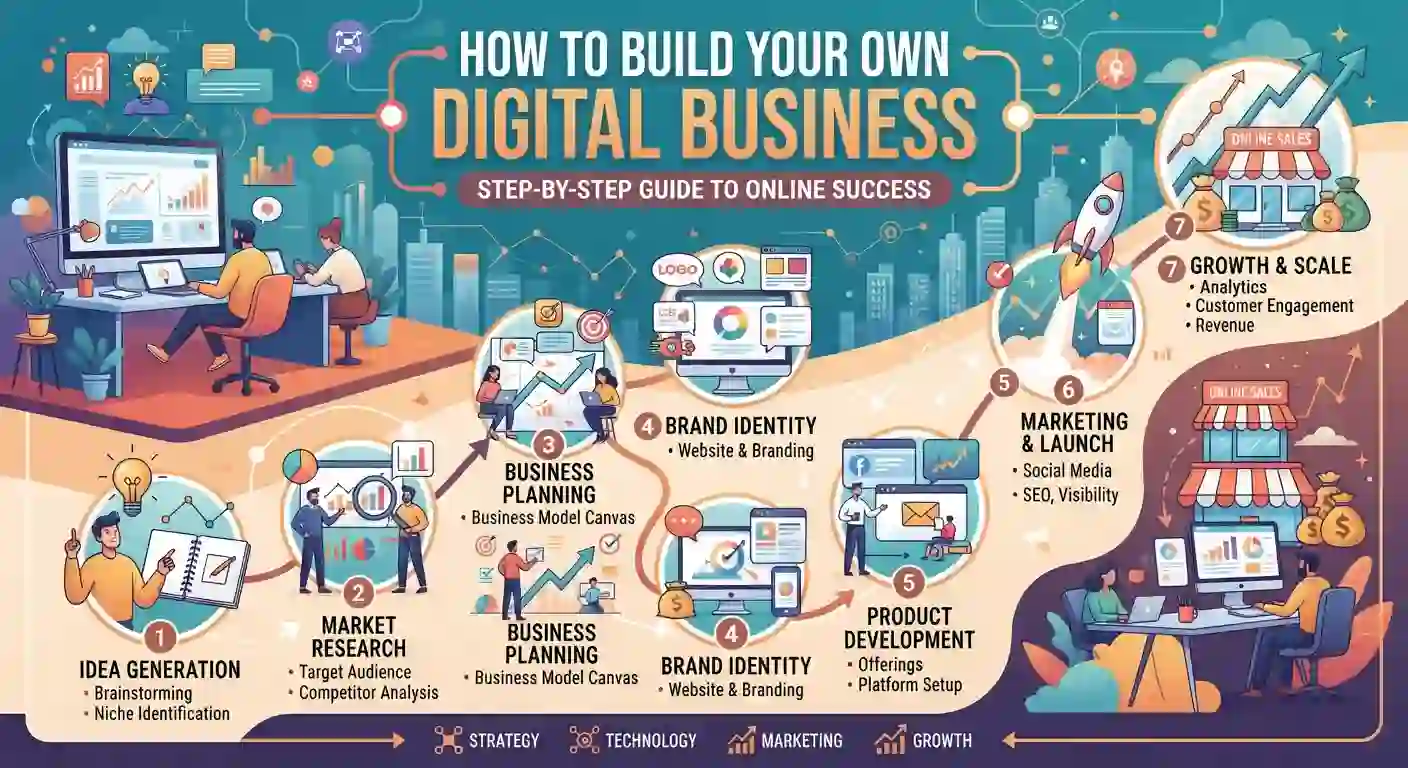
Building a digital business can seem complicated when you look at everything involved—business strategy, websites, branding, marketing, content, technology, AI, and automation. The good news is that you do not need to build everything at once. A successful online business can be developed step by step, with each stage creating a stronger foundation for the next.
The roadmap below brings together the ideas covered throughout this guide and turns them into a practical process. Whether you want to sell products, provide services, build an affiliate website, launch a startup, or create a content-based business, the same basic principles can help you move from an idea to a scalable digital operation.
Step 1 — Choose a Business Idea
Every digital business begins with an idea, but a good idea should solve a real problem rather than simply sound interesting. Start by considering your skills, experience, interests, and the problems people are willing to pay to solve.
For example, someone with SEO skills could offer search optimization services, build an affiliate website, or create educational content. Someone with web development skills could build websites or develop software products.
Focus on the intersection of what you can do, what people need, and what can generate revenue. You do not need a completely original concept. Improving an existing solution or serving a specific audience can be enough to create a viable business.
Step 2 — Research Your Market
Once you have an idea, research the market before investing significant time or money. Market research helps you understand your potential customers, competitors, existing solutions, pricing, and demand.
Identify who your ideal customer is and what problem they are trying to solve. Then study businesses already serving that audience. Look at their websites, content, products, pricing, marketing channels, and customer reviews.
The goal is not to copy competitors. Instead, look for gaps and opportunities. You may discover that customers need a simpler service, better support, more specialized information, or a solution designed for a particular niche.
Step 3 — Validate the Idea
Market research tells you whether an opportunity appears promising, but validation gives you stronger evidence that people actually want your solution.
Start small. Talk to potential customers, publish useful content, create a landing page, offer a basic service, or build a simple version of your product. For a software startup, this could mean developing a minimum viable product (MVP) rather than a complete application.
Pay attention to real behavior. Sign-ups, inquiries, purchases, email subscriptions, and positive customer feedback are stronger signals than simply asking people whether they like an idea.
Validation allows you to discover problems early and improve your business before committing substantial resources.
Step 4 — Build Your Website
Your website becomes the central digital location for your business. It can explain your offer, demonstrate credibility, publish content, collect leads, sell products, or allow customers to access services.
Choose the technology according to your needs. A small business or content website may be able to start with WordPress, while a complex product may require custom web development.
Your website should have:
- A clear purpose
- Simple navigation
- Mobile-friendly design
- Fast loading performance
- Secure connections
- Clear calls to action
- Search-friendly structure
- Useful, original content
For a deeper understanding of the technical foundation, see the section on Web Development: Building Your Digital Presence earlier in this guide.
Step 5 — Create Your Brand
A brand is more than a logo or color scheme. It represents how customers recognize and perceive your business.
Define your business name, visual identity, tone of communication, target audience, value proposition, and overall positioning. Keep your branding consistent across your website, social media profiles, emails, advertisements, and other customer touchpoints.
A strong brand should also communicate why someone should choose you instead of an alternative. Your unique value proposition should be clear enough that a visitor can quickly understand what you offer and who it is for.
Step 6 — Develop Your Marketing Strategy
Creating a website does not automatically bring customers. You need a marketing strategy that connects your business with the right audience.
Start by selecting channels that match your customers and business model. These may include:
- SEO
- Content marketing
- Social media
- Email marketing
- Paid advertising
- Affiliate marketing
- Partnerships
- Local marketing
SEO can help attract people who are actively searching for solutions, while social media can help build awareness and relationships. Email marketing can turn visitors into an audience that you can communicate with repeatedly.
For a broader strategy, learn more about how to grow a small business using digital marketing and build your channels around measurable business goals rather than vanity metrics.
Step 7 — Create Content
If you plan to earn from a blog, follow our guide to starting a successful blog that makes money. Content gives your business something valuable to offer before asking customers to buy. It can also demonstrate expertise, answer questions, attract search traffic, and build trust.
Create content based on the problems and questions of your target audience. Depending on your business, this could include:
- Blog posts
- Tutorials
- Case studies
- Videos
- Guides
- Product comparisons
- Social media posts
- Email newsletters
- Downloadable resources
Instead of publishing large amounts of generic content, focus on usefulness and relevance. A smaller collection of genuinely helpful resources can be more valuable than dozens of repetitive articles.
Step 8 — Generate Traffic
Once your website and content are ready, focus on bringing qualified visitors to your business.
Organic search can become a long-term traffic source when your content satisfies search intent and your website provides a strong technical foundation. Social media, communities, partnerships, email marketing, and paid advertising can provide additional sources of traffic.
Avoid depending entirely on one channel. Search algorithms, advertising costs, and platform policies can change. Developing multiple reliable traffic sources makes your business more resilient.
Most importantly, measure quality of traffic, not just visitor numbers. A smaller audience that subscribes, contacts you, or purchases from you can be more valuable than thousands of visitors who leave without taking action.
Step 9 — Introduce AI and Automation
Once your business has repeatable processes, identify tasks that can be improved with AI and automation.
AI can assist with research, content ideas, customer support, data analysis, document processing, and other knowledge-based tasks. Automation can connect applications and handle repetitive workflows such as lead notifications, email sequences, data transfers, and routine administrative work.
However, automation should support a good process—not compensate for a broken one. First understand how a task works manually, then determine whether technology can make it faster, more consistent, or less expensive.
Start with a few high-impact workflows and expand gradually.
Step 10 — Monetize Your Business
One digital-product example is selling Notion templates. Your business needs a sustainable revenue model. The right approach depends on what you are offering and who your customers are.
Common digital business models include:
- Selling products
- Selling digital products
- Offering freelance services
- Subscription services
- Software as a Service (SaaS)
- Affiliate marketing
- Advertising
- Consulting
- Online courses or memberships
You can also combine several models. For example, a content website might generate revenue through affiliate partnerships, digital products, and advertising.
The important point is to connect monetization with genuine customer value. Revenue should come from solving problems, providing useful products or services, or connecting customers with relevant solutions.
Step 11 — Analyze Performance
After launching, use data to understand what is working and what needs improvement.
Track metrics that relate directly to your business objectives. Depending on your model, these could include website traffic, conversion rate, leads, customer acquisition cost, revenue, profit, email subscribers, returning visitors, or customer retention.
Do not measure everything simply because the data is available. Choose key performance indicators that help you make decisions.
For example, if your website receives significant search traffic but generates few leads, the problem may be your landing pages, offer, messaging, or calls to action rather than traffic itself.
Regular analysis turns your business from a collection of activities into a system that can continuously improve.
Step 12 — Scale
Scaling should come after you have established a business model that works. Growing too quickly before understanding your customers, processes, and economics can create unnecessary costs and operational problems.
Once you have consistent demand, look for ways to increase capacity without creating the same increase in workload. This could involve:
- Automating repetitive processes
- Hiring freelancers or employees
- Improving internal systems
- Expanding your content
- Entering new markets
- Adding new products or services
- Improving conversion rates
- Building recurring revenue
- Investing in better technology
AI, automation, cloud services, and business software can make scaling easier, but technology should support a clear business strategy.
The ultimate goal is not simply to become bigger. It is to create a business that can serve more customers, generate sustainable revenue, maintain quality, and operate efficiently.
13. Essential Tools and Resources for Online Business
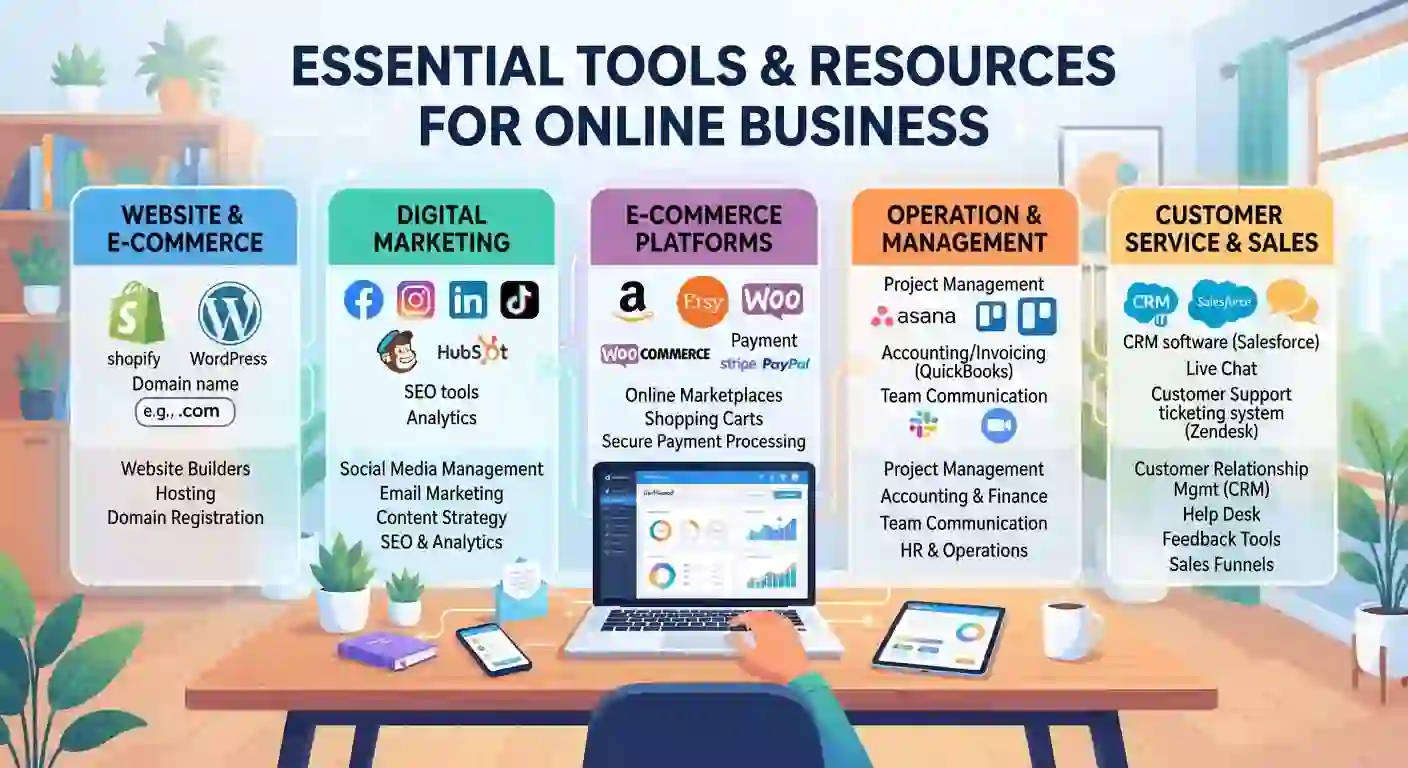
Running an online business efficiently requires more than a good idea and a website. The right tools can help you manage daily operations, understand customers, attract organic traffic, create content, automate repetitive tasks, and measure business performance.
However, using too many tools can create unnecessary complexity and expenses. The goal is not to collect as many software platforms as possible, but to choose tools that solve real business problems and improve productivity.
As your business grows, your technology stack can also evolve. You may begin with a website, analytics platform, and a few marketing tools, then gradually add SEO software, AI tools, automation platforms, business intelligence solutions, and specialized applications.
Business Tools
Business tools help entrepreneurs manage operations, projects, customers, finances, communication, and everyday business activities.
Depending on your business model, you may need project management software, customer relationship management (CRM) systems, accounting tools, communication platforms, invoicing software, or business intelligence solutions.
For example, business intelligence tools can help transform business data into useful information for decision-making. If you want to explore this area further, our guide to Best BI Tools for Startups explains how startups can use business intelligence to make smarter decisions.
The best approach is to start with the tools you actually need and expand your technology stack as your business becomes more complex.
Marketing Tools
Marketing tools help businesses attract potential customers, communicate with their audience, manage campaigns, and measure marketing performance.
Common categories include email marketing platforms, social media management tools, advertising platforms, content planning software, customer relationship management systems, and marketing automation tools.
Your choice of marketing tools should depend on your audience and marketing strategy. A small content business may focus heavily on SEO and email marketing, while an ecommerce company may require advertising, social media, analytics, and customer retention tools.
The objective is to create a connected marketing system where each tool contributes to customer acquisition and business growth.
SEO Tools
SEO tools help businesses understand search demand, analyze competitors, monitor rankings, identify technical problems, and improve website visibility.
Useful SEO tool categories include:
- Keyword research tools
- Rank tracking software
- Technical SEO crawlers
- Backlink analysis tools
- Content optimization platforms
- Website auditing tools
- Search performance tools
SEO software can save considerable time during research and analysis, but tools alone cannot create a successful SEO strategy. You still need useful content, strong search intent alignment, good website structure, and a positive user experience.
When selecting SEO software, focus on the features that support your actual workflow instead of paying for dozens of features you will never use.
AI Tools
AI tools are becoming an important part of modern online business operations. They can assist with research, brainstorming, content development, data analysis, customer support, coding, image creation, and many other tasks.
AI is particularly useful when it helps people complete repetitive or time-consuming work faster. For example, a digital marketer can use AI to generate content ideas, organize research, summarize information, or assist with campaign planning.
You can also explore 7 Free AI Tools Every Digital Marketer Needs to see how AI can support everyday marketing tasks.
The most effective approach is to combine AI capabilities with human judgment. AI should support research, creativity, and productivity rather than replace quality control and strategic decision-making.
Automation Tools
Automation tools connect different applications and allow businesses to perform repetitive tasks automatically.
For example, a business could create a workflow that sends a notification whenever a new customer submits a form. Another workflow could move information between applications, update customer records, send emails, or trigger follow-up tasks.
Automation becomes increasingly valuable as a business grows because manual tasks often increase along with customer volume.
However, businesses should first understand a process before automating it. A poorly designed process can become even more problematic when automated.
The goal should be to automate repetitive, predictable tasks while keeping important decisions under appropriate human control.
Website Development Tools
Website development tools provide the technical foundation for your online presence.
Depending on your requirements, these tools can include:
- WordPress
- Website builders
- HTML, CSS, and JavaScript tools
- Code editors
- Hosting platforms
- Domain management tools
- Performance testing tools
- Security tools
- Content management systems
- Version control platforms
A small business website may only require WordPress, reliable hosting, a suitable theme, and a few carefully selected plugins. A software company developing a complex web application may require a much more advanced development environment.
Regardless of the technology you choose, your website should prioritize performance, security, mobile usability, accessibility, and search-friendly architecture.
Freelancing Platforms
Freelancing platforms can help professionals connect with businesses looking for digital services.
Popular freelance services include:
- SEO
- Content writing
- Web development
- Graphic design
- Digital marketing
- Video editing
- AI services
- Virtual assistance
- Software development
Platforms can be useful for finding your first clients, but long-term freelancing success requires more than simply creating an account.
A strong portfolio, professional profile, effective proposals, clear communication, appropriate pricing, and reliable delivery can help freelancers build sustainable client relationships.
As your workload increases, you can also use AI and automation to improve productivity and eventually turn freelance services into an agency or broader digital business.
Analytics Tools
Analytics tools help business owners understand how their websites, marketing campaigns, and customers are performing.
Instead of relying on assumptions, analytics can show where visitors come from, which pages they view, what actions they take, and where they leave the customer journey.
Useful analytics categories include:
- Website analytics
- Search performance analytics
- Conversion tracking
- Customer analytics
- Business intelligence
- Marketing attribution
- Sales dashboards
For example, if a website receives thousands of visitors but very few people contact the business or purchase a product, analytics can help identify where the problem may exist.
The most valuable analytics are those that lead to better decisions. Rather than tracking every available metric, focus on measurements connected to your business goals.
Smart Home Platforms
Smart home platforms are another important part of the wider technology ecosystem. They connect devices such as smart lights, security cameras, thermostats, locks, appliances, sensors, and voice assistants.
These platforms allow users to control devices and create automated routines from a central system.
For businesses, smart home technology creates opportunities in product development, affiliate marketing, content publishing, reviews, installation services, and technology consulting.
As artificial intelligence becomes more deeply integrated with connected devices, smart homes are also becoming more capable of responding intelligently to user behavior and environmental conditions.
For readers interested in this area, our guide to the best smart home security devices provides a practical starting point for understanding smart security technology.
14. The Future of Online Business

The future of online business will be shaped by the continued convergence of artificial intelligence, automation, advanced software, web technologies, digital marketing, freelancing, and connected devices. Businesses are already moving beyond basic digital tools toward systems that can analyze information, assist with decisions, automate workflows, and personalize customer experiences.
The pace of change means businesses do not necessarily need to predict exactly what technology will look like several years from now. Instead, they need to build the ability to adapt, learn, experiment, and adopt useful technology responsibly.
AI adoption among businesses has increased substantially in recent years, while emerging technologies such as agentic AI, IoT, cloud computing, and advanced analytics are continuing to reshape how businesses operate.
The Growth of Artificial Intelligence
Artificial intelligence is likely to become increasingly embedded in everyday business operations rather than remaining a separate technology used only by specialized teams.
Businesses can use AI for research, customer support, content assistance, data analysis, software development, forecasting, personalization, and internal productivity. As AI systems become more capable, employees may increasingly work alongside AI tools to complete tasks faster and make better-informed decisions.
This does not mean that every business needs to become an AI company. Instead, businesses should identify where AI can provide genuine value.
For example, a small online business could use AI to organize customer inquiries, analyze marketing data, generate content ideas, or summarize research. A larger company could integrate AI across sales, operations, customer service, and product development.
The growing importance of AI also means that AI literacy will become an increasingly valuable business skill. OECD research highlights that AI adoption is changing skill requirements and increasing the importance of training and the ability to use, analyze, and interpret data.
AI Agents and Autonomous Workflows
One of the most important developments to watch is the growth of AI agents.
Traditional AI tools generally respond to instructions. Agentic systems can go further by planning tasks, using tools, interacting with external systems, and taking actions toward a defined goal.
For example, instead of asking an AI system to summarize customer feedback manually, an agent-based workflow could potentially collect the feedback, categorize it, identify common problems, prepare a report, and send the results to the appropriate team.
The OECD describes agentic AI as an emerging area involving systems that can pursue goals with greater autonomy through capabilities such as planning, memory, and tool use.
This could eventually change how online businesses organize work. Employees may increasingly supervise AI-driven workflows rather than manually perform every individual task.
However, autonomous systems also create new requirements around security, privacy, accuracy, permissions, and human oversight. Businesses should therefore adopt agents carefully instead of giving automated systems unrestricted access to important operations.
The Rise of Automation
Automation will continue to reduce the amount of repetitive manual work performed by businesses.
Simple automation can already handle tasks such as sending emails, transferring data between applications, updating records, scheduling activities, and notifying team members. More advanced systems can combine automation with AI to handle processes that previously required greater human involvement.
The future will likely involve more connected workflows in which different software systems communicate with one another.
For example:
Customer interaction → AI analysis → CRM update → Automated follow-up → Analytics → Business decision
This type of connected workflow can allow businesses to operate more efficiently without requiring every step to be completed manually.
The most successful businesses will not necessarily automate everything. Instead, they will identify which activities are repetitive and predictable, automate those processes, and keep human involvement where judgment, creativity, relationships, and accountability matter most.
AI-Powered Marketing
Digital marketing is also moving toward greater use of AI.
AI can help marketers analyze audiences, identify patterns, generate ideas, personalize communications, assist with content production, and improve campaign optimization.
Customer experiences may also become more personalized. Instead of showing exactly the same experience to every visitor, businesses can use data and AI to better understand customer needs and deliver more relevant information.
AI agents could eventually participate in parts of the marketing workflow by researching audiences, analyzing campaign performance, identifying opportunities, and recommending or executing certain actions under appropriate controls.
However, the fundamentals of marketing will remain important. Businesses will still need to understand their customers, communicate clear value, build trust, and provide genuinely useful products or services.
Technology can make marketing more efficient, but it cannot replace a strong business strategy.
The Future of Web Development
Web development is also changing as AI-assisted coding and increasingly capable development tools become part of the software development process.
Developers can already use AI to assist with code generation, debugging, documentation, testing, and prototyping. This can make it easier to move from an idea to an early working product.
Over time, websites may also become more interactive and personalized. Instead of simply presenting static information, web applications can increasingly respond intelligently to user behavior and connect with AI-powered services.
This does not make traditional web development skills irrelevant. HTML, CSS, JavaScript, databases, APIs, security, performance, accessibility, and web architecture will remain important foundations.
In fact, as AI makes development faster, understanding these fundamentals can become even more valuable because developers need to evaluate, secure, test, and maintain what AI-assisted systems produce.
The Growth of the Creator and Freelancer Economy
The creator and freelancer economy is likely to remain an important part of the digital business landscape.
The internet has already made it possible for individuals to sell skills, knowledge, creative work, digital products, consulting, and specialized services to customers around the world.
AI may increase this opportunity by allowing individuals and small teams to complete work that previously required larger teams.
A freelancer who combines expertise with AI tools may be able to research faster, produce drafts more efficiently, automate administrative work, and serve more clients without increasing workload at the same rate.
This could also lead to more one-person businesses and small digital teams that operate with sophisticated technology.
However, human expertise will continue to matter. Clients still need people who understand their goals, can communicate clearly, solve unusual problems, and take responsibility for the final result.
Connected Homes and IoT
The growth of connected devices will extend the digital economy beyond computers and smartphones.
Smart homes, wearable devices, connected appliances, security systems, sensors, and other Internet of Things (IoT) technologies can collect information and communicate with digital platforms.
AI can make these systems more intelligent by helping them understand patterns and respond to changing conditions.
For example, a smart home could use connected sensors and AI to optimize energy usage, improve security, or automate household routines.
For online businesses, this creates opportunities across hardware, software, cybersecurity, installation services, content, affiliate marketing, data services, and specialized applications.
The broader trend is important: the internet is becoming increasingly connected to the physical world, not just websites and applications. OECD research identifies IoT, cloud computing, AI, advanced networks, and other emerging technologies as major components of ongoing digital transformation.
What Businesses Should Prepare for Next
Businesses do not need to adopt every emerging technology immediately. Instead, they should prepare their foundations so they can adapt when useful technologies mature.
Several priorities will become increasingly important.
Build strong digital foundations. A reliable website, secure systems, quality data, and efficient business processes make future technology adoption easier.
Develop AI and digital skills. Businesses should help employees understand how to use AI effectively, evaluate its output, and recognize its limitations. Skills gaps remain an important barrier to AI adoption.
Improve data quality. AI and automation depend heavily on reliable information. Poor data can limit the value of advanced systems, particularly when businesses attempt to scale AI agents.
Strengthen cybersecurity and privacy. As businesses connect more systems and automate more decisions, protecting accounts, data, APIs, customer information, and AI workflows becomes increasingly important.
Experiment before scaling. Businesses can start with small AI or automation projects, measure their results, and expand successful workflows gradually.
Keep humans in the loop. Automation should increase business capability without removing appropriate human oversight from important decisions.
Preparing for an Adaptive Digital Future
The future of online business will not be defined by one technology. It will come from the combination of technologies and business strategies.
AI can provide intelligence. Automation can provide efficiency. Websites provide digital presence. Marketing creates visibility. Analytics provides feedback. Freelancing and creator platforms provide new ways to monetize skills. IoT connects digital systems with the physical world.
Businesses that understand how these technologies work together will be better positioned to adapt as the digital economy evolves.
Conclusion
Building a successful online business is not about mastering one technology or marketing channel. It requires a connected ecosystem where business strategy, technology, websites, digital marketing, content, AI, automation, analytics, and skilled people work together. A strong business foundation helps you identify the right opportunity, while a professional website and effective marketing strategy help you reach and convert customers.
As your business grows, SEO and content can generate sustainable visibility, affiliate marketing and digital products can create additional revenue streams, and AI and automation can improve productivity. Technology, cybersecurity, analytics, freelancing, and smart-home innovations also create new opportunities in the digital economy.
The next step is to explore each area in greater depth. Use the individual Business, Startups, Digital Marketing, Affiliate Marketing, Technology, AI Automation, Web Development, Freelancing, and Smart Home pillar guides on Nexesz to develop the specific skills and strategies you need.
Start with one area, take action, measure your results, and gradually build the complete digital business ecosystem.
Frequently Asked Questions
What Is the Best Way to Start an Online Business?
Start by choosing a real problem to solve, researching your target market, and validating your idea before investing heavily. Then build your website, brand, marketing strategy, and gradually introduce AI and automation.
What Digital Skills Are Most Valuable?
Valuable digital skills include SEO, digital marketing, web development, content creation, data analysis, cybersecurity, and AI. Choose one skill that matches your interests and develop practical expertise around it.
How Can AI Help an Online Business?
AI can help with research, content creation, customer support, data analysis, marketing, coding, and repetitive business tasks. When combined with automation, it can save time and improve overall productivity.
How Does Digital Marketing Help Businesses Grow?
Digital marketing helps businesses reach potential customers through SEO, content, social media, email, and paid advertising. A strong strategy can increase visibility, generate leads, and turn visitors into customers.
Is Freelancing a Good Way to Start an Online Career?
Yes, freelancing lets you monetize digital skills without building a large company first. A strong portfolio, professional profile, effective proposals, and reliable client communication can help you build a sustainable career.
Do I Need a Website to Start an Online Business?
A website is not always required initially, but it provides a professional home for your business and helps build credibility. It can also support SEO, content marketing, lead generation, and long-term growth.
What Can I Automate With AI?
AI can automate tasks such as customer inquiries, data organization, reporting, content workflows, lead management, and routine communications. Start with repetitive tasks and keep human oversight for important decisions.
What Is the Difference Between a Startup and a Small Business?
A startup usually focuses on creating a scalable business model and achieving significant growth, often through technology. A small business generally focuses on sustainable revenue while serving a specific market or customer base.
Leave a Reply